
आज हम बात करने वाले हैं Basic Data Type in C in Hindi जिसमें आप सभी basic data type के बारे में जानेंगे और समझेंगे। जब भी हम कोई program लिखते हैं, तो उसमें data store करने की जरूरत पड़ती है — जैसे किसी की age, name, salary, या कोई दशमलव वाली संख्या। C language में कोई भी data store करने से पहले compiler को यह बताना होता है कि हम किस तरह का data store करने वाले हैं इसलिए जिस type का data store करना होता उस type का variable बनाके फिर उसमे data store करते हैं।
इस article में आप सीखेंगे कि C के basic data types — int, char, float, double, और void — क्या होते हैं, इनका उपयोग कैसे होता है, इनके format specifiers क्या हैं, और इन्हें program में कैसे use किया जाता है। साथ ही आप practical program भी देखेंगे जो सभी data types को एक साथ demonstrate करता है।
Table of Contents
Data Type क्या होता है?
मान लीजिए आपके घर में अलग-अलग डिब्बे हैं — एक में चावल रखते हैं, एक में तेल, एक में नमक। हर डिब्बे का एक तय काम है और उसमें वही चीज़ रखी जाती है जिसके लिए वह बना है।
C programming में data type भी कुछ ऐसा ही है। यह compiler को बताता है कि किसी variable में किस तरह की value store होगी — whole number, decimal number, एक character, या कुछ और।
जब आप लिखते हैं:
int age = 20;
तो इसका मतलब है कि age नाम के variable में एक पूरी संख्या (integer) store होगी। Compiler इस जानकारी का उपयोग memory allocate करने और सही operations perform करने के लिए करता है।
C programming में Basic Data Types क्या हैं?
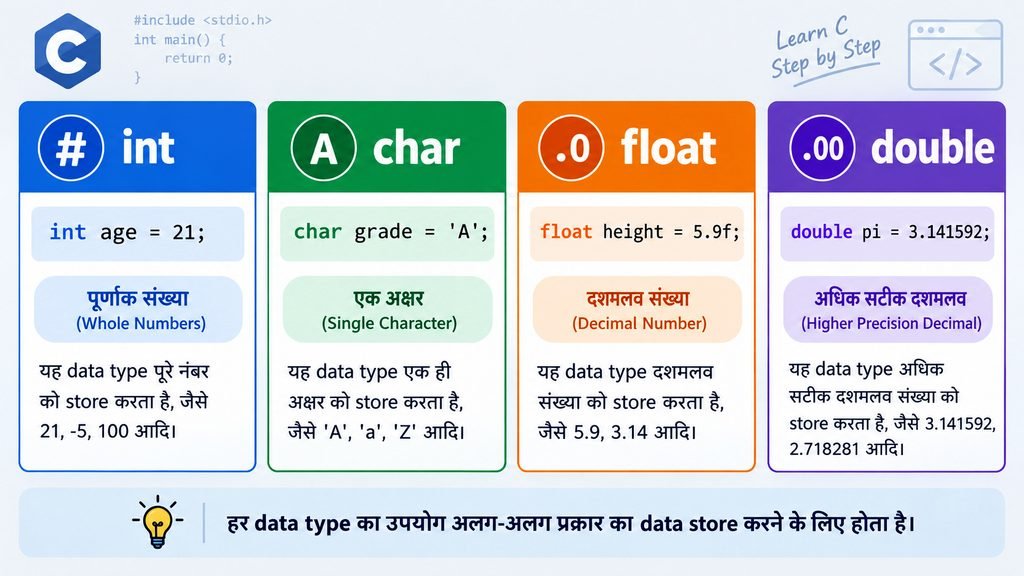
C language में निम्नलिखित basic data types होते हैं:
- int — पूरी संख्याओं के लिए (जैसे 10, -5, 200)
- char — एक single character के लिए (जैसे ‘A’, ‘z’, ‘9’)
- float — दशमलव संख्याओं के लिए, कम precision (जैसे 3.14)
- double — दशमलव संख्याओं के लिए, ज्यादा precision (जैसे 3.14159265)
- void — कोई value नहीं, functions और pointers में use होता है
आइए इन सभी को detail में समझते हैं।
1. int Data Type in C
int का full form होता है integer। यह data type पूरी संख्याओं को store करने के लिए use होता है — यानी वे संख्याएं जिनमें कोई दशमलव भाग नहीं होते।
उदाहरण के तौर पर: किसी की उम्र, एक class में students की संख्या, या किसी product की quantity।
Integer Variable के Declaration और Initialization:
int age; // Declaration
age = 21; // Initialization
int marks = 95; // Declaration + Initialization एक साथ
Example Program:
#include <stdio.h>

int main()
{
    int age = 21;    // Stores age as an integer
    int marks = 95;  // Stores marks as an integer

    printf("Age: %d\n", age);      // Prints age
    printf("Marks: %d\n", marks);  // Prints marks

    return 0;
}
int के लिए format specifier %d होता है। अधिकांश systems पर int 4 bytes की memory लेता है, लेकिन यह implementation-dependent हो सकता है — यानी अलग-अलग compiler और platform पर यह size बदल सकती है।
2. char Data Type in C
char data type एक single character store करने के लिए use होता है। Character को हमेशा single quotes (‘ ‘) में लिखा जाता है।
यह याद रखना जरूरी है कि char एक single character store करता है, पूरी string नहीं। ‘A’ और “A” में फर्क है — ‘A’ एक character है, जबकि “A” एक string है।
C में हर character का एक numeric code होता है जिसे ASCII value कहते हैं। char असल में उस numeric code को store करता है।
Declaration और Initialization:
char grade = ‘A’;
char symbol = ‘#’;
Example Program:
#include <stdio.h>

int main()
{
    char grade = 'A';  // Stores a single character

    printf("Grade: %c\n", grade);  // %c prints a character

    return 0;
}
char के लिए format specifier %c होता है। char सामान्यतः 1 byte की memory लेता है, और यह size C standard के अनुसार guaranteed है।
3. float Data Type in C
float data type दशमलव संख्याओं (floating-point numbers) को store करने के लिए use होता है।
जब आपको किसी की height, temperature, या percentage जैसी values store करनी हों जिनमें दशमलव हो, तो float उपयोगी होता है।
Declaration और Initialization:
float height = 5.9;
float temperature = 36.6;
Example Program:
#include <stdio.h>

int main()
{
    float height = 5.9f;  // Stores a decimal number

    printf("Height: %f\n", height);  // %f prints a floating-point value

    return 0;
}
float के लिए format specifier %f होता है। ध्यान दें कि floating-point literal के अंत में f लगाना एक अच्छी practice है (5.9f), नहीं तो compiler उसे double भी मान सकता है।
float में precision limited होती है — यह लगभग 6–7 significant decimal digits तक accurate होता है। इससे ज्यादा precision के लिए double use करना चाहिए।
4. double Data Type in C
double भी दशमलव संख्याओं के लिए होता है, लेकिन यह float से ज्यादा precise होता है। double लगभग 15–16 significant decimal digits तक accurate होता है।
जब scientific calculations, financial data, या बहुत precise values की जरूरत हो, तो double prefer किया जाता है।
Declaration और Initialization:
double pi = 3.14159265358979;
double salary = 75000.50;
Example Program:
#include <stdio.h>

int main()
{
    double pi = 3.14159265358979;  // Stores a decimal number with double precision

    printf("Pi: %f\n", pi);  // %f prints a double value

    return 0;
}
printf() में double के लिए %f use होता है। लेकिन scanf() में double के लिए %lf use करना जरूरी है। यह एक important difference है जिसे beginners अक्सर ignore कर देते हैं।
double सामान्यतः 8 bytes की memory लेता है, जो float (सामान्यतः 4 bytes) से दोगुना है — इसीलिए इसे “double” कहते हैं।
5. void Data Type in C
void का मतलब होता है “कुछ नहीं” या “कोई value नहीं।” यह अन्य data types से अलग है क्योंकि इसमें कोई value store नहीं होती।
void के दो मुख्य उपयोग हैं:
पहला — void functions: जब कोई function कोई value return नहीं करता, तो उसे void function कहते हैं।
#include <stdio.h>

void display()
{
    printf("Hello, C Programming!\n");  // Prints a message
}

int main()
{
    display();  // Calls the display() function

    return 0;
}
इस example में display() function कोई value return नहीं करता, इसलिए इसका return type void है।
दूसरा — void pointer: void * एक generic pointer होता है जो किसी भी data type के address को hold कर सकता है। यह एक advanced concept है जिसे बाद में pointers पढ़ते समय detail में समझा जाता है।
C में Data Types का Size कैसे Check करें?
C में sizeof operator का उपयोग करके किसी भी data type की memory size bytes में पता की जा सकती है। यह operator size_t type की value return करता है।
#include <stdio.h>

int main()
{
    printf("int    = %zu bytes\n", sizeof(int));     // Prints the size of int
    printf("char   = %zu bytes\n", sizeof(char));    // Prints the size of char
    printf("float  = %zu bytes\n", sizeof(float));   // Prints the size of float
    printf("double = %zu bytes\n", sizeof(double));  // Prints the size of double

    return 0;
}
संभावित Output (system के अनुसार बदल सकता है):
Code की Explanation:
%zu format specifier size_t type की values print करने के लिए use होता है जो sizeof operator return करता है। यह ध्यान रखें कि int और float की size platform और compiler के अनुसार अलग हो सकती है — ऊपर दिए values typical desktop systems के लिए हैं, guaranteed नहीं।
Format Specifiers और Data Types
Format specifiers compiler को बताते हैं कि कौन-सी value किस format में print या input की जाए।
| Data Type | printf() में | scanf() में | Example Value |
|---|---|---|---|
| int | %d | %d | 42 |
| char | %c | %c | ‘A’ |
| float | %f | %f | 3.14f |
| double | %f | %lf | 3.14159 |
Important: printf() और scanf() में double के लिए format specifier अलग-अलग होते हैं। printf() में %f दोनों के लिए काम करता है (क्योंकि float automatically double में promote हो जाता है), लेकिन scanf() में double के लिए %lf जरूरी है।
Data Type चुनना क्यों जरूरी है?
सही data type choose करना एक अच्छे programmer की पहचान है। इसके कई कारण हैं:
Memory का सही उपयोग: अगर आपको सिर्फ 0 से 100 के बीच की संख्या store करनी है, तो double use करना memory की बर्बादी होगी।
Precision: Scientific calculations में float की बजाय double use करना ज्यादा accurate results देता है।
Correct Operations: char पर arithmetic operations अलग तरह से work करते हैं। सही data type choose न करने पर unexpected results आ सकते हैं।
Program का सही behavior: गलत data type use करने पर program compile तो हो जाता है, लेकिन output गलत आता है — यह एक difficult-to-find bug बन सकता है।
उदाहरण के लिए, अगर आप किसी student की percentage store करनी है जो 98.75 हो, तो int use करने पर यह 98 हो जाएगी — दशमलव part खो जाएगा। इसलिए वहाँ float या double use करना सही रहेगा।
Common Beginner Mistakes
C programming सीखते समय beginners ये गलतियाँ अक्सर करते हैं:
गलती 1: float के लिए %d use करना
// गलत
float price = 99.99f;
printf(“%d”, price); // Undefined behavior
// सही
printf(“%f”, price);
गलती 2: char के लिए double quotes use करना
// गलत
char grade = “A”; // “A” एक string है, character नहीं
// सही
char grade = ‘A’; // Single quotes जरूरी हैं
गलती 3: char को string समझना
char सिर्फ एक character store करता है। char name = ‘Ram’; गलत है। पूरी string store करने के लिए char array या string use होती है।
गलती 4: हर system पर data type size same मानना
int का size हर compiler/platform पर 4 bytes ही हो, यह जरूरी नहीं। अगर आपको specific size चाहिए तो <stdint.h> के types जैसे int32_t use करें।
गलती 5: scanf() में double के लिए %f use करना
// गलत
double value;
scanf(“%f”, &value); // Undefined behavior
// सही
scanf(“%lf”, &value);
गलती 6: sizeof के result के लिए %d use करना
sizeof एक size_t value return करता है। इसे print करने के लिए %d की बजाय %zu use करें।
int, char, float और double में अंतर
| Data Type | सामान्य उपयोग | Example | Format Specifier | Typical Size | Important Point |
|---|---|---|---|---|---|
| int | पूरी संख्याएं | 42, -10 | %d | सामान्यतः 4 bytes | दशमलव store नहीं होता |
| char | Single character | ‘A’, ‘9’ | %c | 1 byte (guaranteed) | Single quotes जरूरी |
| float | दशमलव (कम precision) | 3.14f | %f | सामान्यतः 4 bytes | ~6-7 digits accurate |
| double | दशमलव (ज्यादा precision) | 3.14159 | %f (printf), %lf (scanf) | सामान्यतः 8 bytes | ~15-16 digits accurate |
एक छोटा Practical C Program
यह program सभी basic data types को एक साथ demonstrate करता है:
#include <stdio.h>

int main()
{
    int age = 20;
    char grade = 'A';
    float height = 5.9f;
    double balance = 10250.75;

    printf("Age    : %d years\n", age);       // Prints an integer
    printf("Grade  : %c\n", grade);           // Prints a character
    printf("Height : %.1f feet\n", height);   // Prints 1 digit after the decimal
    printf("Balance: %.2f rupees\n", balance); // Prints 2 digits after the decimal

    return 0;
}
Explanation:
age के लिये int use किया गया है क्योंकि उम्र एक पूरी संख्या होती है। grade में char use किया क्योंकि यह एक single character है। height में float use किया क्योंकि यह एक दशमलव value है और ज्यादा precision की जरूरत नहीं। balance में double use किया क्योंकि financial values में ज्यादा precision जरूरी होती है।
%.1f का मतलब है दशमलव के बाद सिर्फ 1 digit print करना, इसलिए height 5.9 दिखती है। इसी तरह %.2f दशमलव के बाद 2 digits print करता है, इसलिए balance 10250.75 दिखता है। इस तरह आप printf() में precision control कर सकते हैं, नहीं तो %f default रूप से 6 digits तक print करता है।
Conclusion ( निष्कर्ष )
इस article में हमने C programming के basic data types — int, char, float, double और void — को सरल हिंदी में समझा। संक्षेप में याद रखने वाली बातें:
- int पूरी संख्याओं के लिए है और इसका format specifier %d है।
- char एक single character store करता है, जिसे हमेशा single quotes (‘ ‘) में लिखा जाता है, और इसका format specifier %c है।
- float कम precision (लगभग 6–7 digits) वाली दशमलव संख्याओं के लिए है।
- double ज्यादा precision (लगभग 15–16 digits) वाली दशमलव संख्याओं के लिए है, और scanf() में इसके लिए %lf जरूरी है।
- void का मतलब “कोई value नहीं” है, और यह functions तथा generic pointers में use होता है।
- sizeof operator से data type की size पता की जा सकती है, और उसे print करने के लिए %zu use करना चाहिए।
- Data types की size हर system पर same हो, यह जरूरी नहीं। specific size के लिए <stdint.h> के types (जैसे int32_t) use करें।
सही data type चुनने से memory का बेहतर उपयोग होता है, calculations accurate रहती हैं, और program में unexpected bugs नहीं आते। Beginners को format specifiers और single/double quotes वाली गलतियों से खास तौर पर बचना चाहिए।
सबसे अच्छा तरीका यह है कि इस article के सभी programs आप खुद type करके run करें और values बदलकर output देखें। Practice से ये concepts पक्के होते हैं।