
अगर आप Structure in C Language in Hindi सीखना चाहते हैं, तो यह पोस्ट आपके लिए एकदम सही जगह है। C Programming में Structure एक ऐसा powerful concept है जो आपको अलग-अलग data types को एक ही नाम के अंदर organize करने की ताकत देता है — ठीक वैसे ही जैसे किसी real-world record (जैसे Student Card या Employee File) में सारी जानकारी एक जगह होती है।
अक्सर beginners C Programming सीखते समय int, float, char जैसे basic data types तो समझ लेते हैं, लेकिन जब बात आती है बड़े और complex data को manage करने की, तो वे अटक जाते हैं। यहीं पर Structure काम आता है। यह C Language का एक user-defined data type है जो आपके code को ज़्यादा readable, organized और professional बनाता है।
इस पोस्ट में हम Structure in C Language को बिल्कुल शुरू से step-by-step समझेंगे — इसमें structure का syntax, variable बनाना, members access करना, array of structures, nested structure, structure with functions, और structure vs union जैसे सभी ज़रूरी topics शामिल हैं। तो चलिए बिना देर किए शुरू करते हैं!
Table of Contents
C Language में Structure क्या है?
Structure in C Language एक user-defined data type होता है। इसका मतलब है कि आप अपनी ज़रूरत के अनुसार खुद एक नया data type बना सकते हैं जिसमें अलग-अलग types के data members एक साथ रह सकते हैं।
उदाहरण के लिए, अगर आपको एक Student का record store करना है जिसमें:
- Roll Number (int)
- Name (char array)
- Marks (float)
हों, तो Structure इन तीनों को एक ही “unit” में बाँध देता है।
ध्यान दें: Structure खुद कोई memory occupy नहीं करता। यह सिर्फ एक template (blueprint) होता है। Memory तब allocate होती है जब हम structure का variable बनाते हैं।
C में Structure का उपयोग क्यों करते हैं?
Structure का use तब होता है जब हमें logically related लेकिन different types के data को एक single unit में store करना हो। इससे code ज़्यादा organized, readable और maintainable बनता है।
Real-life Use Cases:
- Student Record — Roll number, नाम, पता और grade एक ही structure में
- Employee Record — ID, नाम, salary और department (HR systems में common)
- Book Details — नाम, लेखक, मूल्य और ISBN (library management में उपयोगी)
- Product Details — Product ID, नाम, price और manufacturer
बिना Structure के 100 students का data manage करना मतलब 300 अलग-अलग variables बनाना — जो कि बेहद मुश्किल और error-prone होता है। Structure इस समस्या को एकदम आसान बना देता है।
Structure Syntax in C
C में Structure को define करने के लिए struct keyword का उपयोग किया जाता है।
Basic Syntax
struct structure_name
{
    data_type member1;
    data_type member2;
    // ...
};
Important: Structure definition के end में semicolon (;) लगाना अनिवार्य है! यह beginners की सबसे आम गलती है।
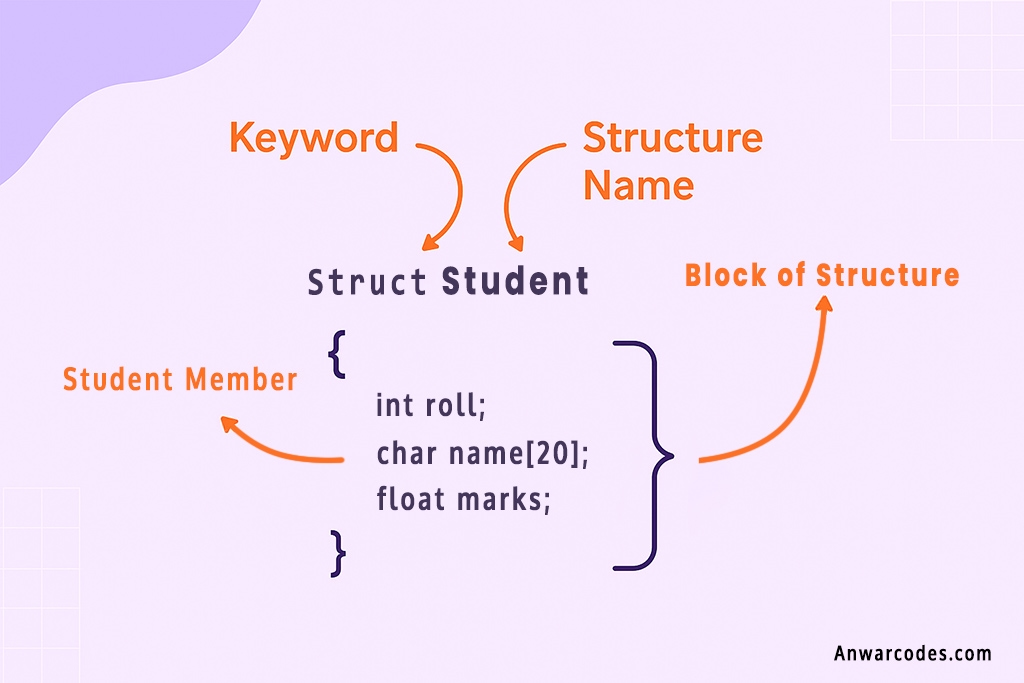
Simple Example — Student Structure
struct Student
{
    int roll;        // Roll number
    char name[20];   // Student का नाम
    float marks;    // Marks
};
यह code सिर्फ एक blueprint है — compile होते समय इसकी कोई memory नहीं बनती।
Structure Variable in C Language कैसे बनाते हैं?
Structure define करने के बाद उसका variable बनाना ज़रूरी है, तभी memory allocate होती है।
तरीका 1 — Definition के बाद Variable बनाना (Recommended)
struct Student s1;
struct Student s2, s3; // एक साथ कई variables
तरीका 2 — Definition के साथ Variable बनाना
struct Student
{
    int roll;
    char name[20];
    float marks;
} s1, s2;
पहला तरीका ज़्यादा readable और standard माना जाता है।
C में Structure Members Access कैसे करते हैं?
Structure के individual members को access या assign करने के लिए Dot (.) Operator का उपयोग होता है, जिसे Member Access Operator भी कहते हैं।
Syntax
structure_variable.member_name;
Example Program — Member Assignment और Display
#include <stdio.h>
#include <string.h>

// Structure to store student information
struct Student {
    int roll;         // Roll number
    char name[20];    // Student name
    float marks;      // Student marks
};

int main() {
    struct Student s1;

    // Assign values to structure members
    s1.roll = 101;
    strcpy(s1.name, "Aman");   // Copy a string into the name member
    s1.marks = 92.5f;

    // Display the structure values
    printf("Roll Number: %d\n", s1.roll);
    printf("Name: %s\n", s1.name);
    printf("Marks: %.1f\n", s1.marks);

    return 0;
}
Structure Initialization in C
Structure को दो तरीकों से initialize किया जा सकता है।
1. Compile-Time Initialization
Variable बनाते समय ही values दे दी जाती हैं, curly braces { } में उसी order में जिस order में members define हुए हैं।
struct Student s1 = {102, “Priya Singh”, 88.0};
2. Runtime Initialization
Program execute होने के बाद dot operator से values assign की जाती हैं।
struct Student s2;

s2.roll = 103;
strcpy(s2.name, "Rahul");
s2.marks = 75.5;
Structure Input/Output in C Language
Structure में data store करने के लिए user से input लिया जाता है और बाद में उसे output के रूप में दिखाया जाता है। नीचे दिए गए Program Code में scanf() और printf() की मदद से Employee Structure का Input/Output दिखाया गया है।
User से Input लेना — Employee Record Example
#include <stdio.h>

// Structure to store employee information
struct Employee {
    int id;             // Employee ID
    char name[20];      // Employee name
    float salary;       // Employee salary
};

int main() {
    struct Employee e1;

    // Read employee details
    printf("Enter Employee ID: ");
    scanf("%d", &e1.id);

    printf("Enter Name: ");
    scanf("%1s", e1.name);   // No '&' is needed for a string

    printf("Enter Salary: ");
    scanf("%f", &e1.salary);

    // Display employee details
    printf("\n--- Employee Details ---\n");
    printf("ID: %d\n", e1.id);
    printf("Name: %s\n", e1.name);
    printf("Salary: %.2f\n", e1.salary);

    return 0;
}
Key Point: String member (char array) में scanf() के साथ & नहीं लगाते — क्योंकि array name खुद ही उसका address होता है।
Array of Structures in C Language in Hindi
जब एक ही प्रकार के कई records store करने हों — जैसे 50 students का data — तब Array of Structures का उपयोग होता है। यह अलग-अलग 50 variables बनाने से कहीं ज़्यादा efficient है।
Syntax
struct Student class[50]; // 50 students का array
Structure Program code — Loop के साथ Input और Output
#include <stdio.h>

// Structure to store student information
struct Student {
    int roll;         // Roll number
    char name[20];    // Student name
};

int main() {
    struct Student students[2];   // Array of 2 student structures
    int i;

    // Read details of all students
    for (i = 0; i < 2; i++) {
        printf("Enter Roll Number of Student %d: ", i + 1);
        scanf("%d", &students[i].roll);

        printf("Enter Name of Student %d: ", i + 1);
        scanf("%s", students[i].name);
    }

    // Display all student details
    printf("\n--- All Students ---\n");
    for (i = 0; i < 2; i++) {
        printf("Roll Number: %d, Name: %s\n",
               students[i].roll,
               students[i].name);
    }

    return 0;
}
Nested Structure in C Programming
जब एक structure के अंदर किसी दूसरे structure का variable रखा जाए, उसे Nested Structure कहते हैं।
उपयोग कब होता है:
- Student के अंदर Address details
- Employee के अंदर Salary structure
- Product के अंदर Manufacturer details
Example — Student के अंदर Address Structure
#include <stdio.h>
#include <string.h>

// Structure to store address information
struct Address {
    int house_no;      // House number
    char city[20];     // City name
};

// Structure to store student information
struct Student {
    int roll;                 // Roll number
    char name[20];            // Student name
    struct Address address;   // Nested structure
};

int main() {
    struct Student s1;

    // Assign values to student members
    s1.roll = 101;
    strcpy(s1.name, "Rohan");

    // Assign values to nested structure members
    s1.address.house_no = 45;
    strcpy(s1.address.city, "Mumbai");

    // Display student details
    printf("Roll Number: %d\n", s1.roll);
    printf("Name: %s\n", s1.name);
    printf("House Number: %d\n", s1.address.house_no);
    printf("City: %s\n", s1.address.city);

    return 0;
}
Important: Nested structure member access के लिए dot operator दो बार लगता है — s1.address.city
| Feature | Structure (struct) | Union (union) |
|---|---|---|
| Memory | हर member को अलग memory | सभी members एक memory share करते हैं |
| Size | सभी members का कुल योग | सबसे बड़े member के size के बराबर |
| Access | सभी members एक साथ access हो सकते हैं | एक समय में केवल एक member |
| Purpose | Related data record बनाना | Memory बचाना |
Size Difference Example:
struct TestStruct
{
    char c;   // 1 byte
    int i;    // 4 bytes
};
// Size: 8 bytes (alignment के साथ)

union TestUnion
{
    char c;   // 1 byte
    int i;    // 4 bytes
};
// Size: 4 bytes (largest member)
Structure with Functions in C
1. Pass-by-Value (Copy भेजना)
Function को structure की copy मिलती है — original data safe रहता है।
void display(struct Student s)
{
    printf("Roll: %d\n", s.roll);
    s.roll = 999; // Original पर कोई असर नहीं
}
2. Pass-by-Reference (Pointer से)
Function को structure का address मिलता है — original data modify हो सकता है। यहाँ Arrow Operator (->) का उपयोग होता है।
void modify(struct Student *ptr)
{
    ptr->roll = 999; // Original value change हो जाएगी
}

int main()
{
    struct Student s1 = {101};

    modify(&s1);

    printf("Roll: %d\n", s1.roll); // Output: 999

    return 0;
}
Key Point: Pointer से structure member access करने के लिए -> (arrow operator) और directly access के लिए . (dot operator) का उपयोग होता है।
Conclusion ( निष्कर्ष )
इस पोस्ट में हमने Structure in C Language in Hindi को पूरी तरह से समझा — structure क्या है, इसका syntax कैसा होता है, variable कैसे बनाते हैं, members को कैसे access और initialize करते हैं, array of structures कैसे काम करती है, nested structure का उपयोग कब होता है, structure vs union का अंतर क्या है, और functions के साथ structure को pass-by-value और pass-by-reference दोनों तरीकों से कैसे use किया जाता है। Structure C Programming की नींव है — इसे समझे बिना real-world programs लिखना बेहद मुश्किल होता है। चाहे आप student database बनाएं, HR system बनाएं या कोई भी बड़ा project — Structure हर जगह काम आता है।
अगर यह पोस्ट आपको helpful लगी हो, तो इसे अपने उन दोस्तों के साथ ज़रूर share करें जो C Programming सीख रहे हैं। नीचे comment में बताएं कि आपको Structure का कौन सा concept सबसे useful लगा — और अगर कोई doubt हो तो भी comment में पूछें, हम जवाब ज़रूर देंगे। C Language के और topics जैसे Pointers, File Handling और Dynamic Memory Allocation के लिए हमारे blog को follow करते रहें!