
Hello दोस्तों!
अभी तक हमने जितने भी Program बनायें हैं, उनमें Data सिर्फ Temporary Store होता है, और ये Data Program के Run के होने तक ही Memory में रहते हैं। और जैसे ही Program Terminate होता है, सारा Data Automatically Delete हो जाता है।
लेकिन C में File Handling की मदद से हम Data को Permanently Store कर सकते हैं, ताकि Program बंद होने के बाद भी Data Safe रहे।
इसलिये आज हम सीखने वाले हैं, File Input Output in C. इस Article में सबसे पहले Theory समझेंगे उसके बाद practical Program देखेंगें।
तो चलिये आज की journey शुरू करते हैं :
Table of Contents
1. C Programming में File Input/Output क्या है?
जब आप अपना पहला “Hello World” Program लिखते हैं, या दो numbers को जोड़ते हैं, तो उसका Result (Output) आपको Screen पर दिखता है। लेकिन जैसे ही आप Program बंद करते हैं, वो Data गायब हो जाता है।
सोचिए, अगर आप एक ऐसा Program बना रहे हैं जिसमें आपको 100 Students का नाम Store करना है। क्या आप हर बार Program चलाने पर 100 नाम फिर से type करेंगे? बिल्कुल नहीं! इस स्थिति में हम File I/O का Use करते हैं।
File I/O का मतलब है अपने Program के जरिए Computer की Hard Drive पर मौजूद files में Data लिखना (Write) या वहां से data पढ़ना (Read) इससे आपका Data हमेशा के लिए सुरक्षित रहता है।
2. File Handling क्यों ज़रूरी है? (Why File I/O?)
- Data Storage: Data Program खत्म होने के बाद भी Delete नहीं होता।
- Big Data: अगर Data बहुत ज्यादा है, तो उसे screen पर दिखाने के बजाय file में save करना आसान होता है।
- Portability: आप एक file बनाकर उसे किसी और को भेज सकते हैं, जिसे वो अपने Program में इस्तेमाल कर सके।
File के साथ काम करने के 3 Basic Steps
C में File के साथ काम करने के लिए हमें बस ये तीन चीज़ें करनी होती हैं:
- File को खोलना (Open a File)
- काम करना (Read or Write)
- File को बंद करना (Close the File)
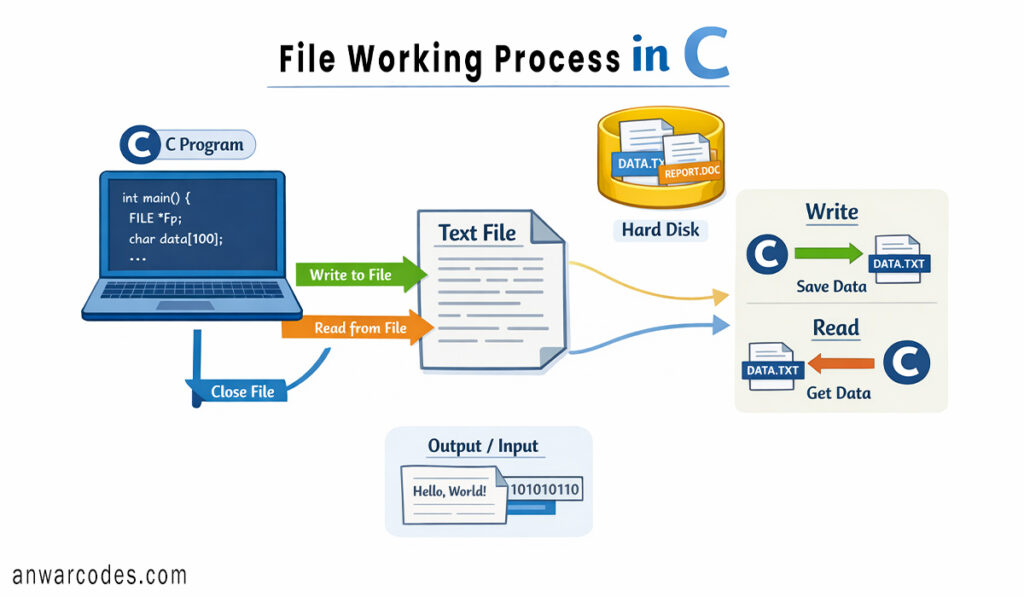
3. FILE Pointer In C
C में File के साथ सीधे काम नहीं किया जा सकता। हमें एक खास Pointer की ज़रूरत होती है, जिसे हम FILE pointer कहते हैं। इसे ऐसे लिखा जाता है:
FILE *fp;
यहाँ FILE एक special structure type है, जिसका उपयोग C में file handling के लिए किया जाता है।
fp एक pointer variable है, जो file stream से जुड़ी information का address store करता है।
4. File Open करना – fopen()
File खोलने के लिए fopen() Function का इस्तेमाल होता है। इसका Syntax (लिखने का तरीका) ऐसा है:
fp = fopen(“filename.txt”, “mode”);
- filename.txt: उस file का नाम जिसे आप खोलना चाहते हैं।
- mode: आप फाइल के साथ क्या करना चाहते हैं? (सिर्फ पढ़ना, लिखना, या दोनों?)
निचे कुछ Common Mode दिए गए हैं, जिन्हे हम इस्तेमाल करते हैं।
File Modes In C Table
| Mode | Meaning | काम |
| “r” | Read | पुरानी file को सिर्फ पढ़ने के लिए खोलता है। |
| “w” | Write | नई file बनाता है। अगर file पहले से है, तो उसका पुराना data मिटा देता है। |
| “a” | Append | फाइल के आखिर में नया data जोड़ने के लिए। पुराना data सुरक्षित रहता है। |
| “r+” | Read + Write | पढ़ने और लिखने दोनों के लिए। |
5. File Close करना (fclose)
काम खत्म होने के बाद file को बंद करना बहुत ज़रूरी है। अगर आप file बंद नहीं करेंगे, तो आपका Data Corrupt हो सकता है या Memory बेकार में खर्च होगी।
fclose(fp);
यहां “fclose” function का नाम है, और bracket (fp) में file Pointer का नाम जिस file को हमें Close करना है।
6. File Reading And Writing In C
अब आते हैं असली काम पर। C हमें File में Data को read और write करने के लिए कई तरीके देता है निचे कुछ Common तरीके को बताया गया है :
A. fprintf()
fprintf() Function का उपयोग file में data को specified format में लिखने के लिए use किया जाता है।
यह printf() की तरह ही काम करता है, फर्क सिर्फ इतना है कि printf() output screen पर दिखाता है
जबकि fprintf() output file में write करता है।
Syntax Explanation:
fprintf(fp, “format string”, variables);
- fp (File Pointer): यह उस File का Address है जहाँ आप लिखना चाहते हैं। (जैसे: fp)
- “format string”: यहाँ आप बताते हैं कि Data किस Type का है, जैसे %d (नंबर के लिए), %s (नाम के लिए), आदि।
- variables: उन Variables के नाम जिनका Data आप File में भेजना चाहते हैं।
उदाहरण: अगर आपको file में किसी का रोल नंबर लिखना है: fprintf(fp, “Roll No: %d”, 25);
fprintf() Example Program in C
#include <stdio.h>
#include <string.h>

int main()
{
    char name[30];
    int age;
    int roll;

    printf("Enter Name: ");
    fgets(name, sizeof(name), stdin);

    // Remove the newline character (\n) added by fgets to prevent unwanted line breaks
    name[strcspn(name, "\n")] = '\0';

    printf("Enter Age: ");
    scanf("%d", &age);

    printf("Enter Roll Number: ");
    scanf("%d", &roll);

    // Create a file pointer and open 'data.txt' in write mode
    FILE *fp = fopen("data.txt", "w");

    // Check if the file was opened successfully
    if (fp == NULL)
    {
        printf("Error: File could not be opened\n");
        return 1;
    }

    // Write formatted student details into the file
    fprintf(fp, "Name : %s\n", name);
    fprintf(fp, "Age  : %d\n", age);
    fprintf(fp, "Roll : %d\n", roll);

    // Close the file to ensure data is saved and memory is released
    fclose(fp);

    printf("Data successfully stored in the file.\n");

    return 0;
}
Output In Console
Enter Name: Aman
Enter Age: 22
Enter Roll Number: 201
Data successfully stored in the file.
Output In (data.txt)
Name : Aman
Age : 22
Roll : 201
Note: name[strcspn(name, “\n”)] = ‘\0’; इस line का सीधा सीधा मतलब है, Automatic Generated नई line को हटाना।
B. fscanf()
इस Function का इस्तेमाल File से Data Read करने के लिए करते हैं। यह भी scanf() जैसा ही लेकिन यह file से Data Read करने के काम आता है। चलिये देखते हैं कैसे fscanf() function के मदद से file में Data को Access कर सकते हैं।
fscanf() Example Program In C
#include <stdio.h>
int main()
{
    char name[30];
    int age;
    int roll;
    // Step 1: Open the file in 'Read' mode ("r")
    FILE *fp = fopen("data.txt", "r");
    // Step 2: Check if the file exists and opened successfully
    if (fp == NULL)
    {
        printf("Error: Could not find or open the file!\n");
        return 1;
    }
    // Step 4: Use fscanf to read data by matching the pattern in the file
    // "Name : %s\n" means: Skip the label "Name : " and store the string into the 'name' variable
    fscanf(fp, "Name : %s\n", name);

    // Skip the label "Age : " and store the integer into the 'age' variable
    fscanf(fp, "Age : %d\n", &age);

    // Skip the label "Roll : " and store the integer into the 'roll' variable
    fscanf(fp, "Roll : %d\n", &roll);
    // Step 5: Display the data retrieved from the file on the screen
    printf("--- Data Retrieved From File ---\n");
    printf("Name: %s\n", name);
    printf("Age: %d\n", age);
    printf("Roll: %d\n", roll);
    // Step 6: Close the file to release the resource
    fclose(fp);
    return 0;
}
Output:
— Data Retrieved From File —
Name: Aman
Age: 22
Roll: 201
7. File Copy Program in C using fgetc() and fputc()
A. fgetc()
इसका पूरा नाम “File Get Character” है। यह File Pointer (fptr) की मदद से File से एक सिंगल character को पढ़ता है।
Syntax:
int ch = fgetc(fptr);
int का उपयोग: यह फंक्शन int Value इसलिए वापस करता है क्योंकि जब file खत्म हो जाती है, तो यह EOF (End of File) signal देता है, जिसकी Value आमतौर पर -1 होती है।
Automatic Movement: जैसे ही यह एक अक्षर पढ़ लेता है, file का “कर्सर” अपने आप अगले अक्षर पर चला जाता है। आपको उसे आगे बढ़ाने की ज़रूरत नहीं पड़ती।
B. fputc()
इसका पूरा नाम “File Put Character” है। यह File में एक single character को लिखने का काम करता है।
लिखने का तरीका (Syntax):
fputc(ch, fptr);
- ch: वो character या Variable है, जिसे आप File में write करना चाहते हैं।
- fptr: उस file का pointer जहाँ आप लिखना चाहते हैं।
Example Program:
#include <stdio.h>
int main()
{
    int ch;                     // Variable to store one character from source file
    FILE *sour_fptr, *dest_fptr;        // File pointers for source and destination files
    /* Open source file in read mode */
    sour_fptr = fopen("data.txt", "r");
    /* Open destination file in write mode */
dest_fptr = fopen("copy.txt", "w");
    /* Check if both files opened successfully */
    if (sour_fptr == NULL ||dest_fptr == NULL)
    {
        printf("File opening error!\n");
        return 1;
    }
    /* Read one character from source file and write it to destination file */
    while ((ch = fgetc(sour_fptr)) != EOF)
    {
        fputc(ch,dest_fptr);
    }
    /* Message after successful copy */
    printf("File copied successfully.\n");
    /* Close both files */
    fclose(sour_fptr);
    fclose(dest_fptr);
    return 0;
}
Output:
File copied successfully.
8. कुछ ज़रूरी बातें (Important Tips for Beginners)
- Check for NULL: हमेशा चेक करें कि fopen() ने file सही से खोली या नहीं। अगर file नहीं खुलती, तो वह NULL return करता है।
- Overwriting: याद रखें, “w” Mode में पुरानी file का सारा Data delete हो जाता है। अगर आप पुराने Data को बचाना चाहते हैं, तो “a” (Append) Mode का इस्तेमाल करें।
- File Path: अगर file उसी folder में नहीं है जहाँ आपका Program है, तो आपको पूरा रास्ता (Path) देना होगा, जैसे: C:\\Users\\Desktop\\test.txt। (C में डबल स्लैश \\ लगाना पड़ता है)।
- fclose(): file में काम खतम होने के बाद file को बंद करना न भूलें।
Binary Files – एक छोटा सा परिचय
अभी तक हमने जो files देखीं, वो Text Files थीं, जिनका data character के रूप में store होता है और जिन्हें हम Notepad जैसे editor में आसानी से पढ़ सकते हैं।
लेकिन Binary Files में data exact memory format में store होता है — यानी जैसा RAM में है, वैसा ही file में चला जाता है।
इसका मतलब यह हुआ कि:
- Binary file को Notepad में खोलेंगे तो अजीब symbols दिखेंगे
- Line break, space या ASCII conversion नहीं होता
- Data fast और safe तरीके से store होता है
C programming में Binary File open करते समय mode के साथ “rb” add करना जरूरी होता है, जैसे:
- “rb” → read binary
- “wb” → write binary
- “ab” → append binary
Binary files का सबसे बड़ा फायदा यह है कि:
- Structure, array सीधे file में store कर सकते हैं
- Data corruption के chances कम होते हैं
- File handling ज्यादा efficient होती है
शुरुआत में आप ज़्यादातर Text Files पर काम करेंगे,
लेकिन जब आप student record, employee data, login system या large data handle करेंगे, तब Binary Files बहुत काम आती हैं। Binary file को Detail में बाद में Discuss करेंगे।
इसलिए अभी detail में जाने की जरूरत नहीं है,
लेकिन इतना समझ लेना जरूरी है कि Text File Human के लिये होता है और Binary File program के लिये।
9. Quizzes
Q1. C Language में file operation कितने type के होते हैं?
A) 1
B) 2
C) 4
D) 12
Q2. C में file handling के लिए कौन-से functions use किए जाते हैं?
A) scanf()
B) fscanf() और fprintf()
C) printf()
D) gets()
fscanf() file से data read करता है और fprintf() file में data write करता है।Q3. fopen() function का उपयोग किस लिए किया जाता है?
A) File से data read करने के लिए
B) File से data read और write करने के लिए
C) File को open करने के लिए
D) File में data जोड़ने के लिए
fopen() का मुख्य काम file को open करना होता है।Q4. नीचे दिए गए functions में से कौन-सा character read करने के लिए use किया जाता है?
A) putchar()
B) fgetc()
C) fputc()
D) fgets()
fgetc() file से एक single character read करता है।Q5. File handling use करने के लिए कौन-सी header file include करनी होती है?
A) stdio.h
B) string.h
C) stdlib.h
D) math.h
stdio.h header file में declared होते हैं।10. FAQS
Q1. C language में file handling क्यों ज़रूरी होती है?
Ans: जब हमें program का data permanent store करना होता है, ताकि program बंद होने के बाद भी data सुरक्षित रहे, तब file handling का use किया जाता है।
Q2. C में file open करने के लिए कौन-सा function use होता है?
Ans: C में file open करने के लिए fopen() function use किया जाता है।
यह function file को read, write या append mode में open करता है।
Q3. fopen() fail होने पर NULL क्यों return करता है?
Ans: अगर file मौजूद नहीं है, permission नहीं है, या path गलत है, तो fopen() file open नहीं कर पाता और NULL return करता है।
Q4. fgetc() और fputc() में क्या फर्क है?
Ans: fgetc() → file से एक character read करता है।
fputc() → file में एक character write करता है।
Q5. file को close करना क्यों ज़रूरी होता है?
Ans: fclose() करने से file properly save होती है, memory free होती है और data loss का risk नहीं रहता।
इसलिए program के end में file close करना mandatory होता है।
11. निष्कर्ष (Conclusion)
आज आपने सीखा file input output से related theory और Practical Program. मैं आशा करता हूँ, आपके लिए useful रहा होगा। C Programming में File Input/Output एक बहुत ही Powerful feature है। यह आपके छोटे से Program को एक असली Software बनाने की ताकत देता है जो data को संभाल कर रख सके। बस याद रखें— file को खोलो, काम करो और बंद कर दो!
शुरुआत में शायद FILE *fp थोड़ा अजीब लगे, लेकिन जैसे-जैसे आप 2-3 Program बनाएंगे, यह आपके लिए बहुत आसान हो जाएगा।