
C language में Check Number is Positive, Negative or Zero in C एक बहुत ही basic और important program है जो हर नए programmer को सीखना चाहिए। यह program आपको conditional statements यानी if-else की real-world application समझने में मदद करता है। अगर आप C programming की नींव मजबूत करना चाहते हैं, तो यह concept आपके लिए बेहद जरूरी है।
इस blog post में हम step-by-step समझेंगे कि C language में कोई number positive है, negative है, या zero है — यह कैसे check किया जाता है। इसके साथ ही हम program का पूरा code, उसकी logic, example output, और कुछ advanced variations भी देखेंगे जो आपकी समझ को और गहरा बनाएंगे।
चाहे आप एक beginner हों जो C programming अभी-अभी शुरू कर रहे हों, या कोई student जो exam की तैयारी कर रहा हो — इस guide को पढ़ने के बाद आप इस program को खुद लिखने में पूरी तरह सक्षम हो जाएंगे। तो चलिए शुरू करते हैं!
Table of Contents
Check Number is Positive, Negative or Zero in C — Overview
किसी भी number को तीन categories में divide किया जा सकता है:
- Positive Number: जो numbers 0 से बड़े होते हैं, जैसे 1, 5, 100, 999
- Negative Number: जो numbers 0 से छोटे होते हैं, जैसे -1, -50, -999
- Zero: न positive, न negative — बस 0
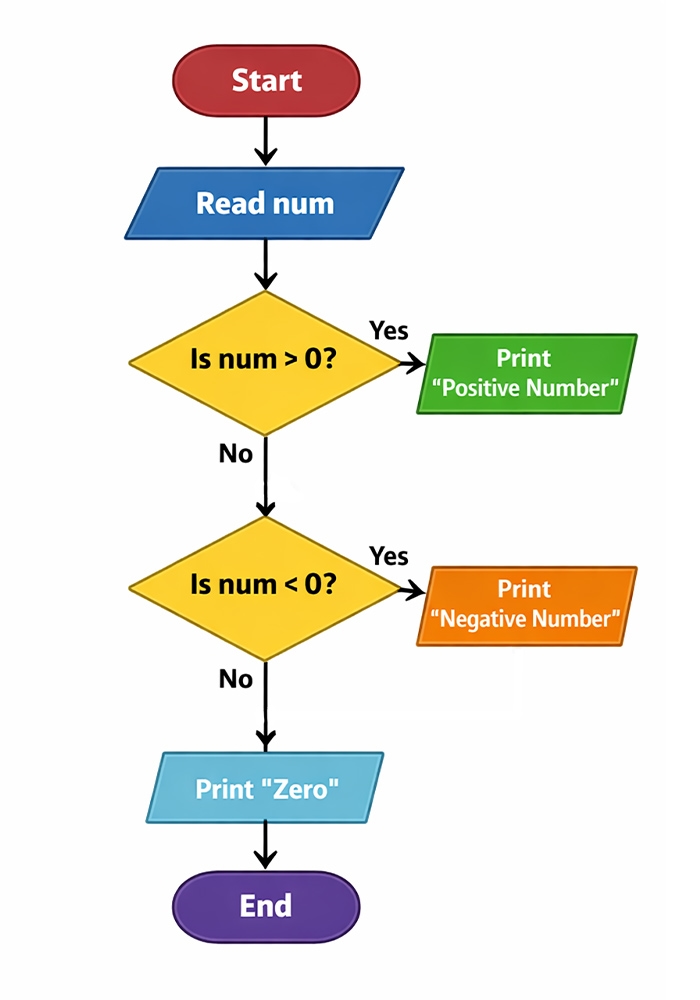
C language में इसे check करने के लिए हम if-else if-else conditional structure का use करते हैं। यह structure C programming की सबसे fundamental concepts में से एक है।
Program Code — Check Number is Positive, Negative or Zero in C
#include <stdio.h>


int main()
{
    int num;


    printf("Enter a number: ");
    scanf("%d", &num);


    // Check whether the number is positive, negative, or zero
    if (num > 0)
    {
        printf("Positive Number\n");
    }
    else if (num < 0)
    {
        printf("Negative Number\n");
    }
    else
    {
        printf("Zero\n");
    }


    return 0;
}
Output (Example 1):
Output (Example 2):
यह एक simple, clean, और beginner-friendly program है। इसे compile करते ही यह user से number मांगता है और तुरंत result print कर देता है।
Step-by-Step Program Logic
Step 1 — Header File Include करना
#include <stdio.h>
stdio.h यानी Standard Input Output Header File — यह file C program में printf() और scanf() functions को use करने की permission देती है। बिना इसके program compile नहीं होगा।
Step 2 — Variable Declaration
int num;
यहाँ int data type का use किया गया है क्योंकि हम एक integer number check करना चाहते हैं। num वह variable है जिसमें user का input store होगा। अगर आप decimal numbers भी check करना चाहते हैं, तो float या double use कर सकते हैं।
Step 3 — User से Input लेना
printf("Enter a number: ");
scanf("%d", &num);
printf() screen पर message print करता है, और scanf() user से keyboard के जरिए input लेता है। %d format specifier integer value के लिए use होता है। &num का मतलब है — num variable का memory address, जहाँ value store होगी।
Step 4 — Positive Check
if (num > 0)
{
	printf("Positive Number");
}
अगर num की value 0 से बड़ी है, तो यह condition true होगी और program “Positive Number” print करेगा। उदाहरण के लिए अगर user ने 42 enter किया, तो 42 > 0 true है।
Step 5 — Negative Check
else if (num < 0)
{
	printf("Negative Number");
}
अगर पहली condition false हो गई और num की value 0 से छोटी है, तो यह block execute होगा। उदाहरण: -7 < 0 true है, इसलिए “Negative Number” print होगा।
Step 6 — Zero Check
else
{
	printf("Zero");
}
अगर number न positive है और न negative, तो वह definitely zero ही होगा। else block automatically तब run होता है जब ऊपर की दोनों conditions fail हो जाती हैं।
| Input | Output |
|---|---|
| 10 | Positive Number |
| -5 | Negative Number |
| 0 | Zero |
| 999 | Positive Number |
| -1 | Negative Number |
Ternary Operator से Positive Negative Zero Check करना
एक advanced तरीका है ternary operator का use करना। यह code को compact बनाता है:
#include <stdio.h>


int main()
{
    int num;


    printf("Enter a number: ");
    scanf("%d", &num);


    // Check whether the number is positive, negative, or zero
    (num > 0)
        ? printf("Positive Number\n")
        : (num < 0)
            ? printf("Negative Number\n")
            : printf("Zero\n");


    return 0;
}
Output (Example 1):
Output (Example 2):
यह approach experienced programmers के लिए है। Beginners के लिए if-else ज्यादा readable और समझने में आसान होता है।
Float Number के लिए Positive Negative Zero Check
अगर आप 3.14 या –2.5 जैसे decimal numbers check करना चाहते हैं, तो int की जगह float use करें:
#include <stdio.h>


int main()
{
    float num;


    printf("Enter a number: ");
    scanf("%f", &num);


    // Check whether the number is positive, negative, or zero
    if (num > 0)
        printf("Positive Number\n");
    else if (num < 0)
        printf("Negative Number\n");
    else
        printf("Zero\n");


    return 0;
}
Output (Example 1):
Output (Example 2):
यहाँ सिर्फ int को float और %d को %f से replace किया गया है। बाकी logic बिल्कुल same है।
इस Program का Real-World Use क्यों जरूरी है?
Check Number is Positive, Negative or Zero in C का concept सिर्फ एक exercise नहीं है। Real life में इसका use होता है:
- Banking applications में balance check करते समय — अगर balance negative है तो overdraft alert
- Temperature sensors में — negative temperature यानी freezing point से नीचे
- Game development में — score positive, negative, या zero है यह check करना
- Data validation में — user input को validate करना कि कोई invalid value तो नहीं आई
यह concept आपको decision making यानी कि conditional programming की नींव देता है जो आगे चलकर loops, functions, और data structures सीखने में काम आता है।
Conclusion ( निष्कर्ष )
Check Number is Positive, Negative or Zero in C एक ऐसा foundational program है जो C language में if-else की working को practically समझाता है। इस blog में हमने program code, step-by-step logic, float variation, ternary operator approach, और common mistakes — सब कुछ detail में cover किया। इस program को समझने के बाद आप C के और complex programs जैसे calculator, grade checker, या leap year checker भी आसानी से लिख पाएंगे।
अब बारी आपकी है — इस code को अपने compiler में type करें, run करें, और अलग-अलग inputs देकर output देखें। Practice करना ही programming सीखने का सबसे अच्छा तरीका है। अगर यह article helpful लगा हो तो इसे अपने classmates और friends के साथ share करें। C programming से related किसी भी topic पर और जानना हो तो comment में जरूर बताएं!