
C language में Check Character is Vowel or Consonant in C program लिखना हर beginner के लिए एक जरूरी exercise है जो आपको conditionals, character handling और ASCII values की practical समझ देती है। यह एक classic programming problem है जो आपको यह सिखाती है कि C में user input कैसे लें और उस पर logical conditions कैसे apply करें। अगर आप C programming सीख रहे हैं, तो यह program आपके foundation को मजबूत बनाने में बड़ी भूमिका निभाता है।
इस blog post में हम step-by-step समझेंगे कि यह program कैसे काम करता है, इसका logic क्या है, और किन common mistakes से बचना चाहिए। Program का पूरा code, उसकी detailed explanation, और expected output — सब कुछ यहाँ दिया गया है ताकि आप इसे आसानी से समझ सकें और खुद implement कर सकें।
चाहे आप school student हों, college की exam prepare कर रहे हों, या किसी interview की तैयारी में लगे हों — यह post आपके लिए एक complete reference की तरह काम करेगी। अंत तक पढ़ने के बाद आप न सिर्फ यह program खुद लिख पाएंगे, बल्कि इसे और भी optimize करने के तरीके भी जान जाएंगे।
Table of Contents
Check Character is Vowel or Consonant in C — पूरी जानकारी
किसी भी programming language को सीखने के लिए practice सबसे बड़ा हथियार है। Check Character is Vowel or Consonant in C program इसी practice का एक अहम हिस्सा है। इस program में user एक character input करता है और program यह तय करता है कि वह character vowel है, consonant है, या फिर कोई invalid input है।
Problem Statement
C language में एक ऐसा program लिखें जो:
- User से एक character input ले
- बताए कि वह character Vowel (स्वर) है
- बताए कि वह character Consonant (व्यंजन) है
- या फिर Invalid Input है — यानी कोई alphabet नहीं है
यह problem बेहद simple लगती है, लेकिन इसमें कई important concepts छिपे हैं जैसे if-else conditions, logical operators, और character comparison।
Program Code
#include <stdio.h>


int main() {
    char ch;   // Variable to store a single character


    printf("Enter a character: ");
    scanf(" %c", &ch);


    // Check whether the input is an alphabet
    if ((ch >= 'A' && ch <= 'Z') || (ch >= 'a' && ch <= 'z')) {


        // Check whether the alphabet is a vowel
        if (ch == 'a' || ch == 'e' || ch == 'i' || ch == 'o' || ch == 'u' ||
            ch == 'A' || ch == 'E' || ch == 'I' || ch == 'O' || ch == 'U') {


            printf("The entered character is a Vowel.\n");
        } else {
            printf("The entered character is a Consonant.\n");
        }


    } else {
        printf("Invalid input! Please enter an alphabet only.\n");
    }


    return 0;
}
Expected Output
Program Logic की Step-by-Step Explanation
Step 1 — Header File Include करना
#include <stdio.h>
stdio.h एक standard header file है जो printf() और scanf() जैसे input-output functions को use करने की permission देती है। इसके बिना program compile नहीं होगा।
Step 2 — Variable Declaration
char ch;
यहाँ char data type का एक variable ch declare किया गया है। char type सिर्फ एक single character store कर सकता है। चूंकि हमें user से एक character input लेना है, इसलिए char सबसे उपयुक्त data type है।
Step 3 — User से Input लेना
printf("Enter Character : ");
scanf("%c", &ch);
printf() user को screen पर message दिखाता है। scanf(“%c”, &ch) user द्वारा enter किया गया character ch variable में store करता है। %c format specifier specifically character input के लिए use होता है।
Step 4 — Alphabet Check करना
if (ch >= ‘A’ && ch <= ‘Z’ || ch >= ‘a’ && ch <= ‘z’)
यह condition यह सुनिश्चित करती है कि user ने कोई valid alphabet enter किया है या नहीं।
- ch >= ‘A’ && ch <= ‘Z’ — Capital letters A से Z को check करता है
- ch >= ‘a’ && ch <= ‘z’ — Small letters a से z को check करता है
अगर character इन दोनों ranges में नहीं आता (जैसे digit या special character), तो program सीधे “Invalid input” print करता है।
ध्यान दें: C में characters internally ASCII values के रूप में store होते हैं। ‘A’ की ASCII value 65 और ‘Z’ की 90 है। इसी तरह ‘a’ की value 97 और ‘z’ की 122 है। इसीलिए character comparison >= और <= operators से possible है।
Step 5 — Vowel Check करना
if (ch == 'a' || ch == 'e' || ch == 'i' || ch == 'o' || ch == 'u' ||
	ch == 'A' || ch == 'E' || ch == 'I' || ch == 'O' || ch == 'U')
English alphabet में कुल 5 vowels होते हैं: a, e, i, o, u। इस condition में दोनों — lowercase और uppercase vowels — को check किया गया है ताकि program case-sensitive न हो।
अगर character इनमें से कोई भी नहीं है, तो else block execute होता है और “Consonant” print होता है।
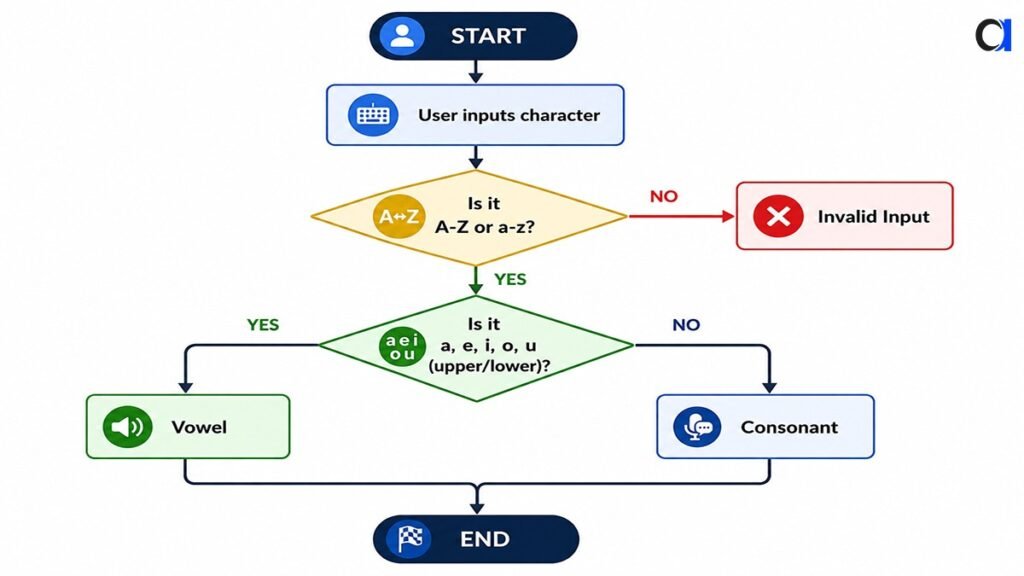
Program का Flow Chart (Conceptual)
निचे दिये गये Flowchart में visual तरीके से समझया गया है कि यह program काम कैसे कर रहा है। इस Flowchart को समझने के बाद Check Character is Vowel or Consonant in C program को खुद से लिख पाएंगे।
Alternative Method — tolower() Function का उपयोग
Program को और concise बनाने के लिए ctype.h library का उपयोग किया जा सकता है।
#include <stdio.h>
#include <ctype.h>


int main() {
    char ch;   // Variable to store a single character


    printf("Enter a character: ");
    scanf(" %c", &ch);


    // Check whether the input is an alphabet
    if (isalpha((unsigned char)ch)) {


        // Convert the character to lowercase
        char lower = tolower((unsigned char)ch);


        // Check whether it is a vowel
        if (lower == 'a' || lower == 'e' || lower == 'i' ||
            lower == 'o' || lower == 'u') {


            printf("The entered character is a Vowel.\n");
        } else {
            printf("The entered character is a Consonant.\n");
        }


    } else {
        printf("Invalid input! Please enter an alphabet only.\n");
    }


    return 0;
}
इस approach में:
- isalpha(ch) automatically check करता है कि character alphabet है या नहीं
- tolower(ch) character को lowercase में convert कर देता है
- इससे आपको uppercase vowels अलग से check नहीं करने पड़ते
- code छोटा और readable बनता है
Switch-Case Method से Vowel Check
if-else के अलावा आप switch statement से भी यह program लिख सकते हैं।
#include <stdio.h>
#include <ctype.h>


int main() {
    char ch;   // Variable to store a single character


    printf("Enter a character: ");
    scanf(" %c", &ch);


    // Check whether the input is an alphabet
    if (!isalpha((unsigned char)ch)) {
        printf("Invalid input! Please enter an alphabet only.\n");
        return 0;
    }


    // Convert the character to lowercase and check it
    switch (tolower((unsigned char)ch)) {
        case 'a':
        case 'e':
        case 'i':
        case 'o':
        case 'u':
            printf("Vowel\n");
            break;


        default:
            printf("Consonant\n");
    }


    return 0;
}
यह method भी उतनी ही effective है और कई बार interviews में switch-case solution माँगा जाता है।
Common Mistakes जो Beginners करते हैं
1. Uppercase Vowels भूल जाना
बहुत से students सिर्फ lowercase vowels check करते हैं और uppercase को ignore कर देते हैं। इससे ‘A’ या ‘E’ enter करने पर गलत output आता है।
2. Operator Precedence का ध्यान न रखना
&& का precedence || से ज्यादा होता है, इसलिए complex conditions में parentheses जरूर लगाएं।
3. %c की जगह %s use करना
single character के लिए हमेशा %c format specifier use करें, %s string के लिए होता है।
4. Invalid Input Check न करना
अगर आप सिर्फ vowel/consonant check करते हैं और digit या special character enter हो जाए, तो program गलत output देगा। इसीलिए alphabet check पहले करना जरूरी है।
यह Program क्यों Important है?
Check Character is Vowel or Consonant in C सिखाता है:
- if-else और switch-case का practical use
- Character data type और ASCII values की समझ
- Logical operators (&&, ||) का सही उपयोग
- Input validation की habit — जो professional coding में बेहद जरूरी है
- ctype.h library functions जैसे isalpha() और tolower()
यह program university exams, competitive programming के basics, और technical interviews — तीनों में काम आता है।
Conclusion ( निष्कर्ष )
Check Character is Vowel or Consonant in C program देखने में simple लगता है, लेकिन यह C programming के कई fundamental concepts को एक साथ cover करता है — character input, conditional statements, logical operators, और input validation। इस program को समझने के बाद आप similar problems जैसे digit check, uppercase/lowercase check, और ASCII-based operations आसानी से solve कर पाएंगे। तीनों methods — basic if-else, tolower() वाला approach, और switch-case — अपने-अपने context में उपयोगी हैं, इसलिए तीनों को अपने हाथ से लिखकर जरूर practice करें।
अब बारी है आपकी! इस program को अपने compiler में run करें, अलग-अलग inputs देकर test करें, और फिर इसे modify करके और features add करने की कोशिश करें — जैसे कि एक loop जो तब तक characters check करता रहे जब तक user ‘q’ न दबाए। जितना ज्यादा आप खुद experiment करेंगे, उतनी जल्दी आपकी C programming मजबूत होगी। कोई doubt हो तो नीचे comment करें!