
क्या आप C programming सीख रहे हैं और Dynamic Memory Allocation in C in Hindi में step-by-step समझना चाहते हैं? तो यह post बिल्कुल आपके लिए है। बहुत से beginners को यह topic थोड़ा complex लगता है, लेकिन इस post में हम इसे इतनी आसान भाषा में समझाएंगे कि आपको एक बार पढ़ने के बाद दोबारा कहीं जाने की जरूरत नहीं पड़ेगी।
इस post में आप सीखेंगे कि memory allocation क्या होती है, static और dynamic allocation में क्या फर्क है, और C language के चारों important functions — malloc(), calloc(), realloc(), और free() — को real code examples के साथ कैसे use किया जाता है। साथ ही हम common mistakes, Stack vs Heap memory का comparison, और एक complete practical example भी देखेंगे।
यह guide उन सभी के लिए है जो C programming में नए हैं या जिन्होंने यह topic पहले पढ़ा है लेकिन अभी भी confuse हैं। हर section में code examples दिए गए हैं ताकि आप सीधे practice शुरू कर सकें। तो चलिए शुरू करते हैं।
Table of Contents
Memory Allocation क्या होती है? (What is Memory Allocation?)
जब कोई C program run होता है, तो उसे computer की RAM में जगह चाहिए होती है — variables store करने के लिए, calculations के लिए, और data रखने के लिए। यह जगह देने की process को Memory Allocation कहते हैं। C में यह दो तरह से होती है।
1. Static Memory Allocation
जब हम program लिखते समय ही किसी variable या array का size पहले से fix कर देते हैं, उसे Static Memory Allocation कहते हैं।
int arr[10]; // size compile time पर fix हो गया
इसमें एक बड़ी problem है — अगर user को सिर्फ 3 numbers store करने हों, तो भी 10 slots की memory बर्बाद होगी। और अगर 15 numbers चाहिए, तो program crash हो सकता है।
2. Dynamic Memory Allocation
जब memory program के runtime पर (यानी program चलते समय) user की जरूरत के हिसाब से allocate की जाती है, उसे Dynamic Memory Allocation कहते हैं। यह memory Heap section में allocate होती है, जो Stack से बड़ी और flexible होती है।
Dynamic Memory Allocation in C क्यों जरूरी है?
| स्थिति | Static Allocation | Dynamic Allocation |
|---|---|---|
| Size पहले से पता हो | ठीक है | ठीक है |
| Size runtime पर पता चले | Problem | Best Solution |
| Memory waste होती है? | हाँ, बहुत बार | नहीं |
| Flexibility | कम | ज्यादा |
| Use case | Simple programs | Real-world apps |
Real-world applications जैसे databases, linked lists, और file systems में data का size पहले से पता नहीं होता। इसीलिए Dynamic Memory Allocation in C इतनी जरूरी है।
C में Dynamic Memory Allocation के 4 Functions
C language में dynamic memory के लिए <stdlib.h> header file में ये 4 functions दिए गए हैं:
| Function | काम |
|---|---|
| malloc() | Memory allocate करता है (garbage values के साथ) |
| calloc() | Memory allocate करता है (zero से initialize) |
| realloc() | पहले से ली हुई memory का size बदलता है |
| free() | Allocated memory को release करता है |
malloc() Function in C Hindi
malloc का full form है — Memory ALLOCation
Syntax
pointer = (datatype*) malloc(size_in_bytes);
malloc() कैसे काम करता है?
- यह heap में specified bytes की memory allocate करता है
- यह memory initialize नहीं करता — garbage values हो सकती हैं
- अगर memory available नहीं है, तो NULL return करता है
- हमेशा NULL check करना जरूरी है
malloc() का Example Program
#include <stdio.h>
#include <stdlib.h>

int main() {
    int *arr;   // Pointer to store the address of dynamically allocated memory
    int n;

    printf("How many numbers do you want to store? ");
    scanf("%d", &n);

    // Dynamically allocate memory for n integers
    arr = (int *)malloc(n * sizeof(int));

    // Check whether memory allocation was successful
    if (arr == NULL) {
        printf("Memory allocation failed!\n");
        return 1;
    }

    // Read array elements
    for (int i = 0; i < n; i++) {
        printf("arr[%d] = ", i);
        scanf("%d", &arr[i]);
    }

    // Display array elements
    printf("You entered: ");
    for (int i = 0; i < n; i++) {
        printf("%d ", arr[i]);
    }

    printf("\n");

    // Release the allocated memory
    free(arr);

    return 0;
}
calloc() Function in C Hindi
calloc का full form है — Contiguous ALLOCation
malloc() और calloc() में अंतर
| Feature | malloc() | calloc() |
|---|---|---|
| Parameters | एक (total bytes) | दो (elements, size each) |
| Initialization | नहीं (garbage values) | हाँ (सब 0 से initialize) |
| Speed | थोड़ा तेज़ | थोड़ा slow |
Syntax
pointer = (datatype*) calloc(number_of_elements, size_of_each);
calloc() का Example Program
#include <stdio.h>
#include <stdlib.h>

int main() {
    int n = 5;   // Number of integers

    // Allocate memory for 5 integers and initialize all values to 0
    int *arr = (int *)calloc(n, sizeof(int));

    // Check whether memory allocation was successful
    if (arr == NULL) {
        printf("Memory allocation failed!\n");
        return 1;
    }

    // Display the default values
    printf("Default values (calloc): ");
    for (int i = 0; i < n; i++) {
        printf("%d ", arr[i]);
    }

    // Update some array elements
    arr[0] = 100;
    arr[1] = 200;

    // Display the updated values
    printf("\nUpdated values: ");
    for (int i = 0; i < n; i++) {
        printf("%d ", arr[i]);
    }

    printf("\n");

    // Release the allocated memory
    free(arr);

    return 0;
}
realloc() Function in C Hindi
realloc का full form है — RE-ALLOCation
realloc() क्यों use करते हैं?
मान लो आपने पहले 3 integers के लिए memory ली, लेकिन बाद में 5 की जरूरत पड़ी। ऐसे में realloc() से memory का size बढ़ाया या घटाया जा सकता है — और पुरानी values safe रहती हैं।
Syntax
pointer = (datatype*) realloc(pointer, new_size_in_bytes);
realloc() का Example Program
#include <stdio.h>
#include <stdlib.h>

int main() {
    // Allocate memory for 3 integers
    int *arr = (int *)malloc(3 * sizeof(int));

    // Check whether memory allocation was successful
    if (arr == NULL) {
        printf("Memory allocation failed!\n");
        return 1;
    }

    // Store initial values
    arr[0] = 10;
    arr[1] = 20;
    arr[2] = 30;

    printf("First 3 values: %d %d %d\n", arr[0], arr[1], arr[2]);

    // Increase the array size from 3 to 5 integers
    arr = (int *)realloc(arr, 5 * sizeof(int));

    // Check whether reallocation was successful
    if (arr == NULL) {
        printf("Memory reallocation failed!\n");
        return 1;
    }

    // Store values in the newly allocated memory
    arr[3] = 40;
    arr[4] = 50;

    // Display all array elements
    printf("After realloc (5 values): ");
    for (int i = 0; i < 5; i++) {
        printf("%d ", arr[i]);
    }

    printf("\n");

    // Release the allocated memory
    free(arr);

    return 0;
}
int *p = (int*) malloc(sizeof(int));

*p = 50;

printf("%d\n", *p);

free(p);   // Memory release

p = NULL;  // Dangling pointer से बचाव (best practice)
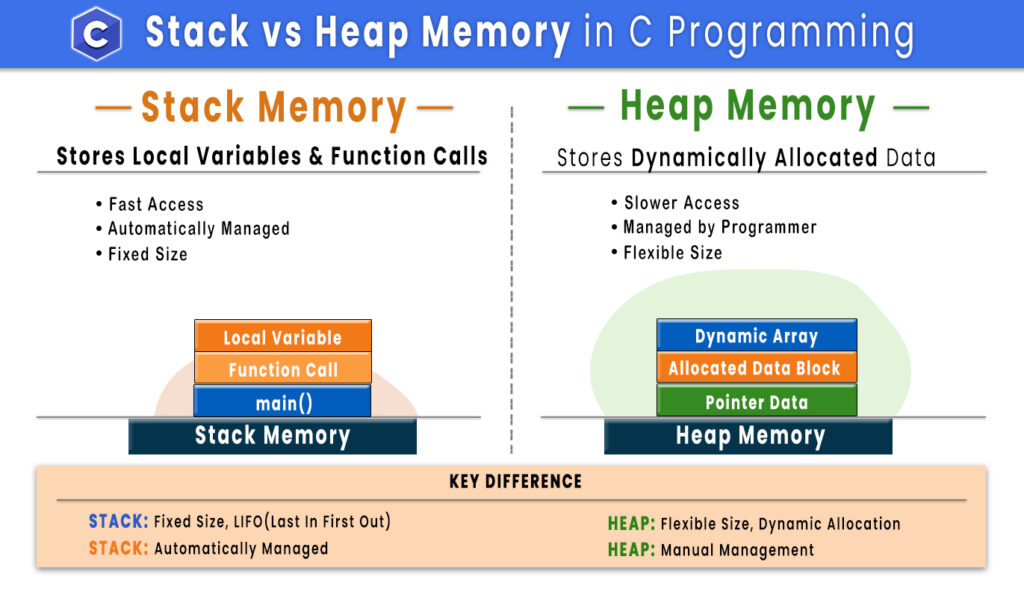
Stack vs Heap Memory – Quick Comparison
Stack Memory और Heap Memory दोनों RAM का हिस्सा होते हैं, लेकिन दोनों का Memory Management, Allocation Method और Use Case अलग-अलग होता है। नीचे दी गई टेबल में इनके मुख्य अंतर को आसान भाषा में समझाया गया है।
| Feature | Stack Memory | Heap Memory |
|---|---|---|
| Allocation | Automatic | Manual (malloc, calloc) |
| Size | Limited | बड़ी और flexible |
| Speed | तेज़ | थोड़ी slow |
| Memory release | Automatic | free() से manually |
| Use case | Local variables | Dynamic data structures |
Dynamic Memory Allocation का Complete Practical Example Program
यह Program Dynamic Memory Allocation के सभी मुख्य Functions—malloc(), realloc() और free()—का एक साथ उपयोग करके दिखाता है। इसमें पहले User से Array का Size लिया जाता है, फिर Memory Allocate की जाती है, Data Store करके Sum और Average निकाला जाता है, उसके बाद realloc() की मदद से Array का Size बढ़ाया जाता है और अंत में free() का उपयोग करके Allocated Memory को Release किया जाता है।
#include <stdio.h>
#include <stdlib.h>

int main() {
    int n;

    printf("How many elements? ");
    scanf("%d", &n);

    // Step 1: Allocate memory for n integers
    int *arr = (int *)malloc(n * sizeof(int));

    // Check whether memory allocation was successful
    if (arr == NULL) {
        printf("Memory allocation failed!\n");
        return 1;
    }

    // Step 2: Read array elements
    for (int i = 0; i < n; i++) {
        printf("Enter element %d: ", i + 1);
        scanf("%d", &arr[i]);
    }

    // Step 3: Calculate the sum and average
    int sum = 0;

    for (int i = 0; i < n; i++) {
        sum += arr[i];
    }

    printf("Sum = %d\n", sum);
    printf("Average = %.2f\n", (float)sum / n);

    // Step 4: Increase the array size by 2 elements
    int *temp = (int *)realloc(arr, (n + 2) * sizeof(int));

    // Check whether memory reallocation was successful
    if (temp == NULL) {
        printf("Memory reallocation failed!\n");
        free(arr);
        return 1;
    }

    arr = temp;

    // Store values in the new elements
    arr[n] = 999;
    arr[n + 1] = 888;

    // Display the updated array
    printf("Extended Array: ");
    for (int i = 0; i < n + 2; i++) {
        printf("%d ", arr[i]);
    }

    printf("\n");

    // Step 5: Release the allocated memory
    free(arr);
    arr = NULL;

    return 0;
}
Common Mistakes जो Beginners करते हैं
गलती 1 – NULL Check ना करना: malloc() fail हो सकता है। हमेशा check करें कि return value NULL तो नहीं है, वरना program crash हो सकता है।
गलती 2 – Dangling Pointer use करना: free() के बाद pointer को NULL assign करें। Free हुई memory को access करना undefined behavior है।
गलती 3 – Double Free: एक ही pointer को दो बार free() करने से program crash हो जाता है। इससे बचने के लिए free के बाद p = NULL करें।
गलती 4 – Memory Leak: Memory allocate करके उसे free करना भूल जाना real-world apps में बहुत बड़ी problem है। हर malloc()/calloc() के लिए एक free() होनी चाहिए।
Conclusion ( निष्कर्ष )
इस post में हमने Dynamic Memory Allocation in C in Hindi को पूरी तरह से और आसान भाषा में समझा। हमने देखा कि static allocation की limitations क्यों होती हैं, और runtime पर flexible memory लेने के लिए malloc(), calloc(), realloc(), और free() कैसे काम करते हैं। साथ ही हमने common mistakes और best practices भी cover कीं — जैसे NULL check करना, free के बाद NULL assign करना, और memory leak से बचना। यह सब concepts real-world C programs में हर जगह use होते हैं।
अगर आप C programming को seriously सीखना चाहते हैं, तो इस post के सभी code examples को खुद type करके compile और run करें — सिर्फ पढ़ने से नहीं, practice करने से concepts clear होते हैं। अगर कोई doubt हो या कोई example समझ न आए, तो नीचे comment करें। इस post को अपने दोस्तों के साथ share करें जो C programming सीख रहे हैं, ताकि उन्हें भी फायदा हो।