
इस post में आप जानेंगे how to declare global variable in C, और अगर global variable के बारे complete जानकारी चाहते हैं, तो यह article आपके लिए ही है। C programming में जब हम किसी variable को program के किसी एक function के अंदर नहीं, बल्कि पूरे program में उपलब्ध कराना चाहते हैं, तो हम global variable का उपयोग करते हैं।
इस article में आप step-by-step समझेंगे कि global variable क्या होता है, इसे कैसे declare करते हैं, और इसका scope क्या होता है। साथ ही हम देखेंगे कि global variable और local variable में क्या फर्क है, extern keyword का क्या काम है, और शुरुआती दिनों में किन किन common mistakes से बचना चाहिये।
यह guide उन लोगों के लिए है जिन्हें C की basic syntax आती है, लेकिन variables के scope और global declaration को लेकर confusion है। अंत तक पढ़ने के बाद आप confidently अपने C programs में global variables का सही उपयोग कर पाएंगे।
Table of Contents
Global Variable in C क्या होता है?
C programming में Global Variable भी एक तरह का Variable होता है जिसमे हम Data रखते हैं, लेकिन global Variable का Scope और Lifetime local Variable से अलग होता है। Global Variable का Scope Program के हर Function से Accessible होता है और यह program के end तक जीवित रहता है। लेकिन Local Variable सिर्फ उसी Function तक सिमित होता है जहाँ वह Declare किया गया हो।
Global Variable की मुख्य विशेषताएं
- यह सभी function के बाहर declare होता है।
- पूरे program की lifetime तक memory में रहता है।
- सभी functions इसे read और modify कर सकते हैं।
- अगर explicitly initialize न किया जाए, तो C compiler इसे automatically 0 (integers के लिए) या NULL (pointers के लिए) से initialize करता है।
How to Declare Global Variable in C – Syntax
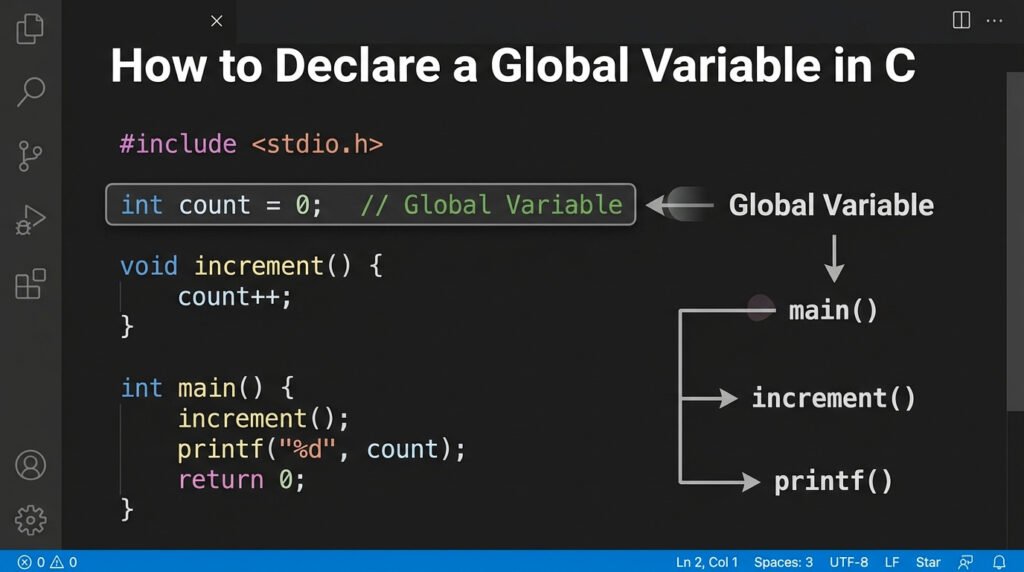
Global variable declare करना बहुत simple है। बस variable को किसी भी function के बाहर, आमतौर पर file के शुरू में #include statements के बाद लिखे जाते हैं।
Syntax:
data_type variable_name;
Global Variable Example Program :
#include <stdio.h>

int count = 0;   // Global variable

void increment()
{
    count++;     // Access and modify the global variable
}

int main()
{
    increment();

    printf("Count: %d\n", count);

    return 0;
}
यहाँ int count = 0; को main() और increment() दोनों functions से पहले declare किया गया है, और यह एक Valid Global Variable Declaration है, इसलिए दोनों functions में directly use किये गये हैं ।
Global Variable Declaration vs Definition
Beginners के लिए यह समझना जरूरी है कि declaration और definition में फर्क होता है।
| Term | मतलब | Example |
|---|---|---|
| Definition | Variable की memory allocate होती है | int count = 0; |
| Declaration | Compiler को बताया जाता है कि variable exists करता है | extern int count; |
जब आप किसी global variable को function के बाहर लिखते हैं और उसे value assign करते हैं (या बिना value के भी लिखते हैं), तो वह उसकी definition होती है। extern के साथ लिखने पर वह सिर्फ declaration होती है — इस पर हम आगे बात करेंगे।
Simple C Global Variable Example
आइए एक complete beginner-friendly example देखते हैं:
#include <stdio.h>

int totalMarks = 0;  // Global variable

void addMarks(int subject)
{
    totalMarks = totalMarks + subject;
}

void displayTotal()
{
    printf("Total Marks: %d\n", totalMarks);
}

int main()
{
    addMarks(85);
    addMarks(90);
    addMarks(78);

    displayTotal();

    return 0;
}
Explanation (हिंदी में):
int totalMarks = 0; को main() से बाहर लिखा गया है, इसलिए यह global variable है। addMarks() function इसमें marks जोड़ता है और displayTotal() function इसे print करता है। दोनों functions को यह variable अलग से pass नहीं करना पड़ा — यही global variable की सबसे बड़ी खासियत है।
Global Variable का Scope और Lifetime
Scope of global variable in C पूरी file तक होता है जिसमें वह declare किया गया है। इसका मतलब है:
- उसी .c file के सभी functions उसे access कर सकते हैं।
- वह main() से पहले memory में आ जाता है।
- Program के return 0; तक memory में रहता है — यानी उसकी lifetime पूरे program execution के बराबर होती है।
Local variable केवल उस function के execution तक ही जीवित रहता है जिसमें वह declare किया गया हो।
Global Variable vs Local Variable in C
यह comparison beginners के लिए बहुत जरूरी है:
| Feature | Global Variable | Local Variable |
|---|---|---|
| Declaration की जगह | Function के बाहर | Function के अंदर |
| Scope | पूरी file / program तक | केवल उस function तक |
| Lifetime | पूरे program execution तक | Function call खत्म होते ही खतम |
| Default Value | 0 (numeric types के लिए) | Garbage value (undefined) |
| Memory | Data segment में | Stack में |
Global Variable vs Local Variable – Example Program
चलिये एक छोटे Program से समझते हैं, Local Variable और Global Variable में क्या difference है।
#include <stdio.h>

int globalVar = 100;  // Global variable

void showValues()
{
    int localVar = 50;  // Local variable

    printf("Global: %d, Local: %d\n", globalVar, localVar);
}

int main()
{
    showValues();

    printf("Global from main: %d\n", globalVar);

    // printf("%d", localVar);  // ERROR: localVar is not accessible here

    return 0;
}
extern Keyword in C – Multiple Files में Global Variable का Use
जब आपका project एक से ज्यादा .c files में होता है और आप एक file में declare किए गए global variable को दूसरी file में use करना चाहते हैं, तो extern keyword काम आता है।
File 1: main.c
#include <stdio.h>

int score = 0;  // Global variable

void updateScore(int points)
{
    score += points;
}

int main()
{
    updateScore(10);

    printf("Score: %d\n", score);

    return 0;
}
File 2: helper.c (अगर अलग file में access करना हो)
extern int score; // सिर्फ declaration — memory यहाँ allocate नहीं होती
void resetScore() {
score = 0;
}
extern int score; compiler को बताता है कि यह variable कहीं और define है — उसे नई memory allocate न करे। यह multi-file C projects में global variable declaration का standard तरीका है।
Common Mistakes जो Beginners करते हैं
1. Global variable को function के अंदर declare करना और global समझ लेना
void myFunction() {
int x = 10; // यह local है, global नहीं
}
2. एक ही नाम का local और global variable — confusion
#include <stdio.h>

int value = 100;  // Global variable

void show()
{
    int value = 50;  // Local variable shadows the global variable

    printf("%d\n", value);  // 50 will be printed
}

int main()
{
    show();

    return 0;
}
इसे variable shadowing कहते हैं। Function के अंदर अगर same name का local variable हो, तो global variable temporarily hidden हो जाता है।
3. Multiple files में extern के बिना global variable use करना
दूसरी file में extern keyword लगाए बिना global variable access करने पर linker error आएगा।
4. जरूरत से ज्यादा global variables बनाना
हर छोटी चीज के लिए global variable न बनाएं — यह program को maintain करना मुश्किल बना देता है।
Best Practices for Using Global Variables in C
- Global variables का उपयोग तभी करें जब truly जरूरी हो — जैसे configuration values, counters जो multiple functions को चाहिए।
- Global variables को meaningful names दें जैसे totalStudentCount न कि x या temp।
- जहाँ संभव हो, function parameters और return values prefer करें — इससे code ज्यादा readable और testable बनता है।
- अगर global variable को किसी function के अंदर accidentally modify न हो, तो const keyword use करें: const int MAX_SIZE = 100;
- Multi-file projects में हमेशा एक header file (.h) में extern declarations रखें।
Conclusion ( निष्कर्ष )
इस article में हमने विस्तार से समझा कि how to declare global variable in C — syntax से लेकर scope, lifetime, local vs global comparison, extern keyword, और common mistakes तक। C programming में global variable एक powerful tool है, लेकिन इसका सोच-समझकर उपयोग करना जरूरी है। अगर program में बहुत ज्यादा global variables हों तो code को debug करना और maintain करना मुश्किल हो जाता है — इसलिए इन्हें जरूरत पड़ने पर ही use करें।
ऊपर दिए गए examples को अपने compiler में run करके देखें और खुद एक छोटा program बनाएं जिसमें एक global variable को कम से कम तीन अलग functions से access किया जाए। Practice से ही concepts clear होते हैं। अगर कोई doubt हो या कोई topic और समझना हो, तो नीचे comment करें।