
अगर आप C Language सीख रहे हैं और एक ऐसे Concept को समझना चाहते हैं जो आपको असली दुनिया के बड़े Data को मैनेज करने में मदद करे, तो आप बिल्कुल सही जगह पर हैं। आज हम C Programming के एक बहुत ही महत्वपूर्ण Topic Structure in C Language in Hindi में विस्तार से बात करेंगे।
इस पोस्ट में हम Structure in C Language in Hindi में step-by-step समझेंगे—syntax, structure variable creation, members access, array of structures, nested structures और एक practical example प्रोग्राम तक।
तो चलिए, आज की यात्रा शुरू करते हैं!
Table of Contents
1. C Language में Structure क्या है?
आसान शब्दों में कहें तो, Structure C Language में एक user-defined data type होता है — यानी हम अपने ज़रूरत के अनुसार एक नया data type बना सकते हैं। यह हमें अलग-अलग data types (जैसे int, char, float आदि) के कई Items को एक ही नाम के अंदर एक साथ bundle करने की अनुमति देता है।
Structure खुद कोई memory occupy नहीं करता। यह सिर्फ एक template होता है जो यह बताता है कि इस structure के variable के अंदर कौन-कौन से members और किस type के data होंगे।
Memory केवल तब allocate होती है जब हम structure का variable बनाते हैं — और उतनी ही memory मिलती है जितनी उसके सभी members के size का कुल योग होता है (proper alignment के साथ)।
2. C में Structure का उपयोग क्यों करते हैं?
C में structure का use तब होता है जब हमें logically related लेकिन different types के data को एक single unit में store करना हो—जैसे database-style records या real-world objects। इससे code ज़्यादा organized, readable और maintainable बनता है।
कल्पना कीजिए कि आपको एक छात्र (Student) का पूरा record store करना है। इस record में ये चीजें होंगी:
- रोल नंबर (Roll Number): int
- नाम (Name): char array
- मार्क्स (Marks): float
अगर हम structure का इस्तेमाल नहीं करेंगे, तो हमें हर student के लिए ये तीन अलग variables बनाना पड़ेंगे: int roll_num; char name[20]; float marks;
लेकिन structure से हम इन तीनों को मिलाकर एक नया type (struct Student) बना सकते हैं — यही user defined data type in C है और इसी से बड़े-बड़े programs में data को आसानी से manage किया जाता है।
Real-life examples / practical use cases:
- Student Record: रोल नंबर, नाम, पता और grade एक ही structure में store करना।
- Employee Record: ID, नाम, salary और department को एक साथ रखना (HR systems में common)।
- Book Details: नाम, लेखक, मूल्य और ISBN — library management में उपयोगी।
3. Structure Syntax In C
Structure in C Language in Hindi में समझने के लिए इसका Syntax जानना सबसे ज़रूरी है।
Struct keyword in C क्या करता है
C Language में Structure को define करने के लिए हम struct नाम के keyword का उपयोग करते हैं।
यह keyword compiler को बताता है कि अब हम एक नया Structure Data Type define करने जा रहे हैं।
Basic syntax
Structure को define करने का बुनियादी Syntax इस प्रकार है:
struct structure_name {
    data_type member1;
    data_type member2;
    ...
};
ध्यान दें: Structure definition के end में semicolon (;) लगाना अनिवार्य है! यह सबसे आम गलती है जो beginners करते हैं।
Simple Example
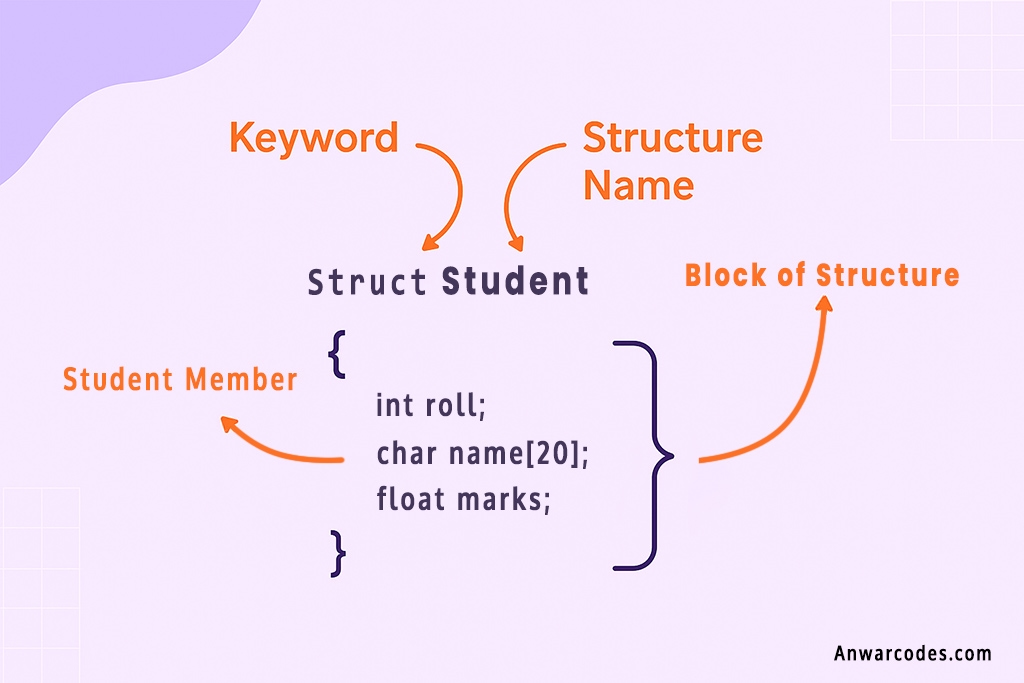
यहाँ एक Student Structure का उदाहरण दिया गया है, जिसे define करके हम उसका Template बना रहे हैं।
// Structure Definition
struct Student {
    // Structure के members (सदस्य)
    int roll;            // integer type का member
    char name[20];       // character array type का member
    float marks;         // float type का member
}; // Semicolon (;) अनिवार्य है!
ऊपर दिया गया Code सिर्फ एक Blueprint है। यह compile होते समय कोई मेमोरी नहीं लेता। यह बस compiler को बता रहा है कि एक Student नाम का structure कैसा दिखेगा।
4. Structure Variable In C Language कैसे बनाते हैं?
Structure define करने के बाद, हमें structure का उपयोग करने के लिए variables बनाने पड़ते हैं।
Structure variable बनाने के 2 तरीके
तरीका 1: Definition के साथ Structure Variable बनाना (Less Common)
हम structure definition के end में भी variables declare कर सकते हैं:
struct structure_name {
    ...
} variable1, variable2;
तरीका 2: Definition के बाद Structure Variable बनाना (Most Common)
यह variable बनाने का सबसे standard और recommended तरीका है। Structure Name अब एक Data Type की तरह काम करता है।
struct structure_name variable_name;
Syntax और Simple Example
// Step 1: Structure define करें (Blueprint बनाएं)
struct Student {
    int roll;
    char name[20];
    float marks;
};

// Step 2: Structure variable बनाएं (अब memory allocate होगी)
int main() {
    // Variable बनाने का सबसे आम तरीका
    struct Student s1;

    // आप एक साथ कई variables भी बना सकते हैं
    struct Student s2, s3, s4;

    // s1, s2, s3, s4 हर एक variable में roll, name, और marks को स्टोर करने की जगह होगी।
    return 0;
}5. C में Structure Members Access कैसे करते हैं?
एक बार जब हम Structure Variable बना लेते हैं, तो हमें उसके individual members (जैसे roll, name, marks) को assign या access करने के लिए हम Dot (.) operator का उपयोग करते हैं।
Dot (.) operator explanation
Dot (.) operator को Member Access Operator भी कहते हैं। यह structure variable को उसके members से जोड़ने का काम करता है।
Syntax:
structure_variable.member_name
C Structure Member Assignment और Display करने का Example Program
#include <stdio.h>
#include <string.h>

struct Student {
    int roll;
    char name[20];
    float marks;
};

int main() {
    struct Student s1; // Structure variable बनाया

    // 1. Members को मान (value) देना (Assignment)
    s1.roll = 101;
    strcpy(s1.name, "Aman"); // Strings के लिए strcpy() का उपयोग क्या जाता
    s1.marks = 92.5;

    // 2. Members के मान को Display करना (Access)
    printf("Roll Number: %d\n", s1.roll);
    printf("Name: %s\n", s1.name);
    printf("Marks: %.1f\n", s1.marks);

    return 0;
}
Output:
Roll Number: 101
Name: Aman
Marks: 92.5
6. Structure Initialization in C
C Language में Structure variables को simple variables की तरह ही initialize किया जा सकता है। यानी हम structure को define करते समय भी value दे सकते हैं या फिर program run होने के बाद value assign कर सकते हैं।
C Structure Compile-Time Initialization Example in Hindi
Compile-time initialization का मतलब होता है variable बनाते समय ही उसके सारे members को value देना। Values curly braces { } के अंदर उसी order में दी जाती हैं, जिस order में members define हुए हैं।
उदाहरण:
struct Student s1 = {102, “Priya Singh”, 88.0};
// यहां: s1.roll = 102, strcpy(s1.name,”Priya Singh”), s1.marks = 88.0
1. Compile-time Initialization (Example Program)
इसमें values program start होने से पहले ही assign कर दी जाती हैं।
#include <stdio.h>

struct Point {
    int x;
    int y;
};

int main() {
    // Compile-time initialization
    struct Point p1 = {10, 20};

    printf("Point P1: (%d, %d)\n", p1.x, p1.y);
    return 0;
}
Output:
Point P1: (10, 20)
2. Runtime Initialization (Example Program)
Runtime initialization का मतलब है कि program execute होने के बाद values assign हों — यानी run-time पर value set की जाए।
#include <stdio.h>

struct Point {
    int x;
    int y;
};

int main() {
    struct Point p2;

    // Runtime initialization – program execute होने के बाद value assign
    p2.x = 5;
    p2.y = 15;

    printf("Point P2: (%d, %d)\n", p2.x, p2.y);
    return 0;
}
Output:
Point P2: (5, 15)
7. Structure Input/Output In C Language
scanf() से Structure Member में Input लेना
हम individual members के लिए Dot (.) operator का उपयोग करते हुए scanf() का उपयोग करते हैं।
scanf(“%d”, &s1.roll);
scanf(“%f”, &s1.marks);
Structure में String input करने का सही तरीका
Structure in C में Character array (String) member के लिए scanf() का उपयोग करते समय ampersand (&) का उपयोग नहीं किया जाता, क्योंकि array name खुद address होता है।
// String member के लिए, & का उपयोग नहीं करते
scanf(“%s”, s1.name);
Structure Program in C Language: Employee Record Real-Life Example
इस Program Structure in C Language का उपयोग करके, Employee का Data User से Input करवायेंगे और फिर Display करेंगे।
#include <stdio.h>

struct Employee {
    int id;
    char name[20];
    float salary;
};

int main() {
    struct Employee e1;

    printf("Enter employee ID, Name and Salary:\n");

    // Input लेना
    printf("Employee ID: ");
    scanf("%d", &e1.id);

    printf("Name: ");
    scanf("%s", e1.name);   // String input — & नहीं लगाना है

    printf("Salary: ");
    scanf("%f", &e1.salary);

    // Output Display करना
    printf("\n--- Employee Details ---\n");
    printf("Employee ID: %d\n", e1.id);
    printf("Name: %s\n", e1.name);
    printf("Salary: %.2f\n", e1.salary);

    return 0;
}
Output:
Enter employee ID, Name and Salary:
Employee ID: 101
Name: Rohan
Salary: 45000
— Employee Details —
Employee ID: 101
Name: Rohan
Salary: 45000.00
8. Array of Structures in C Language in Hindi
Why array of structures?
जब हमें एक ही प्रकार के कई records को store करना होता है, तो हम C में Array of Structures का उपयोग करते है।
उदाहरण के लिए, 100 छात्रों का record store करने के लिए, हमें 100 अलग-अलग structure variables (s1, s2, s3, …) बनाने की बजाय, Structure type का एक array (जैसे struct Student class[100];) बनाना ज़्यादा efficient होता है।
Example: 3 students का data store करना
C Language में Array of Structures बनाना बिलकुल simple array जैसा ही होता है:
struct structure_name array_name[size];

// 3 students का data store करने के लिए array बनाना
struct Student class[3];

// class[0] में पहले student का record होगा।
// class[1] में दूसरे student का record होगा।
// class[2] में तीसरे student का record होगा।

// पहले student का Roll Access करना: class[0].roll
// दूसरे student का Name Access करना: class[1].name
Array of Structures in C with Loop (Hindi में Simple Student Program)
Array of Structures के साथ काम करने के लिए loop (for loop) का उपयोग करना सबसे convenient होता है। इस Program में हम For Loop का उपयोग करके Array of Structure में Value Input करेंगे और Display भी करेंगे।
#include<stdio.h>
struct Student {
    int roll;
    char name[20];
};

int main() {
    struct Student class[2]; // 2 students का array
    int i;

    // Input लेना
    for (i = 0; i < 2; i++) {
        printf("Enter data for Student %d:\n", i + 1);
        printf("Roll: ");
        scanf("%d", &class[i].roll);
        printf("Name: ");
        scanf("%s", class[i].name);
    }

    // Output Display करना
    printf("\n--- All Students Data ---\n");
    for (i = 0; i < 2; i++) {
        printf("Student --> %d: Roll = %d, Name = %s\n",
               i + 1, class[i].roll, class[i].name);
    }

    return 0;
}
Output:
Enter data for Student 1:
Roll: 101
Name: Aman
Enter data for Student 2:
Roll: 102
Name: Priya
— All Students Data —
Student –> 1: Roll = 101, Name = Aman
Student –> 2: Roll = 102, Name = Priya
9. Nested Structure in C Programming
जब एक structure के अंदर किसी दूसरे structure का variable रखा जाता है, तो उसे Nested Structure (Structure inside Structure) कहते हैं।
इसका उपयोग तब किया जाता है जब हमारा data थोड़ा complex हो — जैसे:
- Student के अंदर Address
- Student के अंदर Date of Birth
- Employee के अंदर Salary details
- Product के अंदर Manufacturer details
बहुत आसान Example: Student के अंदर Address Structure
पहले हम Address का structure बनाएंगे, फिर Student structure के अंदर Address को एक member की तरह declare करेंगे।
#include <stdio.h>
#include <string.h>

struct Address {
    int house_no;
    char city[20];
};

struct Student {
    int roll;
    char name[20];
    struct Address address;   // Nested Structure
};

int main() {
    struct Student s1;

    // Nested Structure के members को access करना
    s1.roll = 101;
    strcpy(s1.name, "Rohan");

    s1.address.house_no = 45;
    strcpy(s1.address.city, "Mumbai");

    // Output दिखाना
    printf("Roll: %d\n", s1.roll);
    printf("Name: %s\n", s1.name);
    printf("House No: %d\n", s1.address.house_no);
    printf("City: %s\n", s1.address.city);

    return 0;
}
struct TestStruct {
    char c; // 1 byte
    int i;  // 4 bytes
};
// Size: 1 + 4 = 5 bytes (Alignment padding के कारण 8 bytes हो सकता है)

union TestUnion {
    char c; // 1 byte
    int i;  // 4 bytes
};
// Size: 4 bytes (Largest member के size के बराबर)
Output:
Roll: 101
Name: Rohan
House No: 45
City: Mumbai
Important Point to Understand
- Normal structure member access:
s1.roll - Nested structure member access:
s1.address.house_no
यानी dot operator दो बार लगेगा → (structure → nested structure → member)
10. Structure vs Union (Only Basic Difference)
Union भी Structure की तरह एक User-defined Data Type है, लेकिन इसमें एक मुख्य अंतर है।
| Feature | Structure (struct) | Union (union) |
| Memory Allocation | Each member को अपनी खुद की memory मिलती है। | All members एक ही memory location share करते हैं। |
| Size | सभी members के size का योग। | Largest member के size के बराबर। |
| Data Access | All members को एक ही समय पर access किया जा सकता है। | Only one member को एक ही समय पर access किया जा सकता है। |
| Keyword | struct | union |
| Purpose | Related data को एक record की तरह store करना। | Memory save करना जब एक समय में एक ही member की जरूरत हो। |
Structure vs Union Size Difference (Simple Example in C)
struct TestStruct {
    char c; // 1 byte
    int i;  // 4 bytes
};
// Size: 1 + 4 = 5 bytes (Alignment padding के कारण 8 bytes हो सकता है)

union TestUnion {
    char c; // 1 byte
    int i;  // 4 bytes
};
// Size: 4 bytes (Largest member के size के बराबर)
11. Structure with Functions In C
Function में Structure variables को pass करने के दो तरीके हैं :
1. Structure Pass-by-Value in C (Hindi में आसान Example)
Pass-by-value का मतलब है कि structure variable की copy function को भेजी जाती है।
Function के अंदर किए गए किसी भी change का original structure पर कोई असर नहीं पड़ता।
Simple Example: Structure Pass-by-Value
#include <stdio.h>

struct Student {
    int roll;
};

// Pass-by-value function
void display_roll(struct Student s) {
    printf("Roll inside function (copy): %d\n", s.roll);

    // Try to modify (won't affect the original)
    s.roll = 500;
}

int main() {
    struct Student s1 = {101};

    display_roll(s1);  // Copy send होती है

    printf("Roll in main (original): %d\n", s1.roll);
    // Output: 101 (original value unchanged)

    return 0;
}
Output:
Roll inside function (copy): 101
Roll in main (original): 101
Key Point
- Function को सिर्फ copy मिलती है
- Original structure same रहता है
- Changes function तक सीमित रहते हैं
2. Structure Pass-by-Reference (Pointer Use) in C
Pass-by-reference में structure का address pass किया जाता है, यानि pointer function को मिलता है।
Function pointer की मदद से original structure Member को directly modify कर सकता है।
Simple Example: Structure Pass-by-Reference Using Pointer
#include <stdio.h>

struct Student {
    int roll;
};

// Pass-by-reference function (modify original)
void modify_roll(struct Student *ptr) {
    // Arrow operator (->) का उपयोग
    ptr->roll = 999;
}

int main() {
    struct Student s1 = {101};

    modify_roll(&s1);  // Address pass किया गया
    printf("Roll after modification: %d\n", s1.roll);
    // Output: 999 (original value changed)

    return 0;
}
Output:
Roll after modification: 999
Key Point
- Function को structure का address मिलता है
- Arrow operator (->) से members access होते हैं
- Original structure की values change हो जाती हैं
13. Quizzes (Structure in C Language)
Q1. C Language में Structure क्या है?
A) Built-in Data Type
B) User-defined Data Type
C) Keyword
D) Library Function
Q2. Structure definition किस keyword से शुरू होती है?
A) class
B) structure
C) struct
D) type
struct keyword का उपयोग किया जाता है।Q3. Structure members को access करने के लिए कौन सा operator उपयोग होता है?
A) &
B) ->
C) Dot (.) operator
D) *
s.roll.Q4. क्या Structure में different data types के members हो सकते हैं?
A) Yes
B) No
C) Only int and char
D) Only two data types
Q5. Array of Structures का मुख्य उद्देश्य क्या है?
A) Single record store करना
B) Multiple unrelated data store करना
C) Multiple related records store करना
D) Function create करना
14. FAQs: Structure in C Language in Hindi
Q1. Structure और Array में सबसे बड़ा अंतर क्या है?
Ans: Structure में आप different data types (int, float, char आदि) को एक ही नाम के अंदर store कर सकते हैं।
Array में केवल एक ही data type के elements store किए जा सकते हैं। इसलिए logically related लेकिन अलग-अलग type के values को रखने के लिए Structure सही विकल्प है।
Q2. Structure define करते समय सबसे common mistake क्या होती है?
Ans: सबसे common mistake है Structure की definition के बाद semicolon (;) लगाना भूल जाना।
struct Student {
   int roll;
};  // ← यह semicolon जरूरी है
इसके बिना compile-time error आता है।
Q3. क्या Structure variable को एक बार में printf() से print कर सकते हैं?
Ans: नहीं, Structure को एक object की तरह print नहीं किया जा सकता।
आपको हर member को अलग-अलग print करना पड़ेगा:
printf("%d", s1.roll);
printf("%s", s1.name);
printf("%f", s1.marks);
Q4. Nested Structure क्या होता है और इसका उपयोग कब किया जाता है?
Ans: जब एक structure के अंदर दूसरा structure member की तरह रखा जाता है, उसे Nested Structure कहते हैं।
यह complex data को manage करने में उपयोग होता है—जैसे Student के अंदर Address details, Employee के अंदर Salary details आदि।
Q5. Structure को function में pass करने के कितने तरीके हैं?
Ans: Structure को function में दो तरीकों से pass किया जा सकता है:
1. Pass-by-Value: Structure की copy function को जाती है, original data नहीं बदलता।
2. Pass-by-Reference (Pointer): Structure का address pass किया जाता है, जिससे function original data को modify कर सकता है।
Pointer वाले case में arrow operator ( -> ) का उपयोग होता है।
15. Conclusion: Structure in C Language in Hindi
उम्मीद है कि Structure in C Language in Hindi का यह पूरा deep-dive आपको structures को जड़ से समझने में मददगार रहा होगा। चलिये एक छोटा सा recap देख लेते हैं:
- Structure एक User-defined Data Type है।
- यह अलग-अलग data types को एक नाम के अंदर organize करता है।
- Structure को define करने के लिए struct keyword का उपयोग किया जाता है।
- Members को access करने के लिए dot (.) operator का इस्तेमाल होता है।
Beginners के लिए Structure क्यों जरूरी है?
Structure C Programming की नींव है।
Real-world programs में complex data को manage करने, clean code लिखने और बड़े systems को handle करने में इसका बड़ा रोल है। Beginner हो या intermediate—structure की समझ मजबूत होना जरूरी है।
यह Post आपको कैसा लगा आप इससे क्या सीखे Comment में जरूर बतायें, और जो C Programming सीख रहे हैं C Language Structure को Detail में समझना चाहते तो ये Post उन्हें Share करके उनकी मदद करें।
Thanks For Visiting Anwarcodes.com