
C Program to Check Temperature Program बनाना C Language सीखने वाले beginners के लिए एक बेहतरीन practice exercise है। इस program में हम user से temperature input लेते हैं और उस temperature के आधार पर यह decide करते हैं कि मौसम Hot है, Normal है या Cold है। अगर आप C Programming में if-else statement को practically समझना चाहते हैं, तो यह program उसके लिए perfect example है।
इस blog post में हम step-by-step एक complete C program लिखेंगे जो temperature check करेगा। साथ ही हम program के हर एक line को आसान Hindi में explain करेंगे ताकि एक beginner भी इसे आसानी से समझ सके। Program का logic, variables, और conditions — सब कुछ detail में cover किया गया है।
इस post को पढ़ने के बाद आप जानेंगे कि float variable कैसे use करते हैं, scanf() और printf() functions कैसे काम करते हैं, if-else if-else ladder कैसे लिखते हैं, और एक real-world problem को C code में कैसे convert करते हैं। तो चलिए शुरू करते हैं!
Table of Contents
C Program to Check Temperature क्या है?
C Program to Check Temperature एक simple conditional program है जिसमें user से Celsius में temperature लिया जाता है और तीन conditions के आधार पर output display किया जाता है। यह program C Language के if, else if, और else statements को समझने के लिए एक classic beginner-level example है।
यह program तीन categories में temperature classify करता है:
- Hot — जब temperature 30°C या उससे ज्यादा हो
- Normal — जब temperature 15°C से ज्यादा और 30°C से कम हो
- Cold — जब temperature 15°C या उससे कम हो
Program Statement
C Language में एक program लिखिए जो user से temperature input ले और नीचे दिए गए conditions के आधार पर message print करे:
- Temperature 30 या 30 से ज्यादा होने पर → “Hot” print करो
- Temperature 15 से ज्यादा और 30 से कम होने पर → “Normal” print करो
- ऊपर की दोनों conditions false होने पर → “Cold” print करो
Program Code
#include <stdio.h>

int main() {
    float temp;   // Variable to store the temperature

    printf("Enter temperature in degree Celsius: ");
    scanf("%f", &temp);

    // Check the temperature range
    if (temp >= 30) {
        printf("Hot\n");
    } else if (temp >= 15) {
        printf("Normal\n");
    } else {
        printf("Cold\n");
    }

    return 0;
}
Program Output
Test Case 1 — Hot:
Test Case 2 — Normal:
Test Case 3 — Cold:
Code Explanation (Step-by-Step)
चलिए अब इस C Program to Check Temperature Program के हर एक line को detail में समझते हैं।
Step 1: Header File Include करना
#include <stdio.h>
stdio.h एक predefined library है जिसका full form है Standard Input Output Header। इसे include करने की वजह यह है कि इस program में हम printf() और scanf() functions use कर रहे हैं, और ये दोनों functions इसी library में defined हैं। बिना इस library को include किए compiler इन functions को recognize नहीं करेगा।
Step 2: main() Function
int main()
C में program की execution हमेशा main() function से शुरू होती है। int का मतलब है यह function एक integer value return करेगा। Program के अंत में return 0; लिखा जाता है जो OS को बताता है कि program successfully complete हुआ।
Step 3: Variable Declaration
float temp;
यहाँ float data type का एक variable temp declare किया गया है। float इसलिए use किया गया है क्योंकि temperature decimal values में भी हो सकती है जैसे 27.5°C या 14.8°C। अगर हम int use करते तो decimal part lost हो जाता।
Step 4: User से Temperature Input लेना
printf(“Enter temperature in degree Celsius: “);
scanf(“%f”, &temp);
printf() function user को screen पर एक message दिखाता है जिससे user समझे कि उसे क्या input करना है। scanf() function user द्वारा enter की गई value को read करके temp variable में store कर देता है। यहाँ %f format specifier है जो float values के लिए use होता है, और &temp का मतलब है temp variable का memory address।
Step 5: Program Logic — if-else if-else Ladder
यह इस program का सबसे important हिस्सा है।
if (temp >= 30)
{
	printf("Hot");
}
पहली condition: अगर temp की value 30 या उससे ज्यादा है, तो if block execute होगा और screen पर “Hot” print होगा। उदाहरण के तौर पर — अगर user ने 44 enter किया तो 44 >= 30 true है, इसलिए “Hot” print होगा।
else if (temp >= 15)
{
	printf("Normal");
}
दूसरी condition: यह तभी check होगी जब पहली condition false हो। अगर temperature 15 से ज्यादा है (और ऊपर की condition से यह already 30 से कम है), तो “Normal” print होगा। जैसे temperature 22 हो तो 22 >= 15 true है, output “Normal” होगा।
else
{
	printf("Cold");
}
तीसरी condition (else): अगर ऊपर की दोनों conditions false हों, यानी temperature 15 से कम या बराबर हो, तो else block execute होगा और “Cold” print होगा।
एक और Useful Program — Temperature के साथ Exact Message
नीचे एक extended version है जो user को और detailed message देता है:
#include <stdio.h>

int main() {
    float temp;   // Variable to store the temperature in Celsius

    printf("Enter temperature in degree Celsius: ");
    scanf("%f", &temp);

    // Check the temperature and display its status
    if (temp >= 30) {
        printf("Temperature: %.1f°C\n", temp);
        printf("Status: Hot! Stay hydrated.\n");
    } else if (temp >= 15) {
        printf("Temperature: %.1f°C\n", temp);
        printf("Status: Normal. Enjoy the weather!\n");
    } else {
        printf("Temperature: %.1f°C\n", temp);
        printf("Status: Cold! Wear warm clothes.\n");
    }

    return 0;
}
इस version में %.1f format specifier use किया गया है जो float value को 1 decimal place के साथ print करता है। यह output को ज्यादा user-friendly बनाता है।
if-else if-else Ladder कैसे काम करता है?
इस C Program to Check Temperature में जो logic use हुई है उसे if-else if-else ladder कहते हैं। इसकी working इस तरह होती है:
- पहले if की condition check होती है।
- अगर वो true है तो उसका block execute होकर बाकी सब skip हो जाता है।
- अगर false है तो else if की condition check होती है।
- अगर वो भी false है तो else block execute होता है।
यह structure तब useful होती है जब multiple conditions check करनी हो और हर condition के लिए अलग output चाहिए हो।
Common Mistakes जो Beginners करते हैं
C Program to Check Temperature का Code लिखते समय beginners अक्सर ये गलतियाँ करते हैं:
- int की जगह float use न करना जिससे decimal temperature values गलत हो जाती हैं
- scanf() में & operator भूल जाना — यह memory address pass करने के लिए जरूरी है
- Conditions का order गलत रखना — पहले higher value check करनी चाहिए
- Curly braces {} को सही से close न करना
- %f की जगह %d use करना float variable के साथ
Flowchart — Program का Logic
Program का logic flowchart में इस तरह होगा:
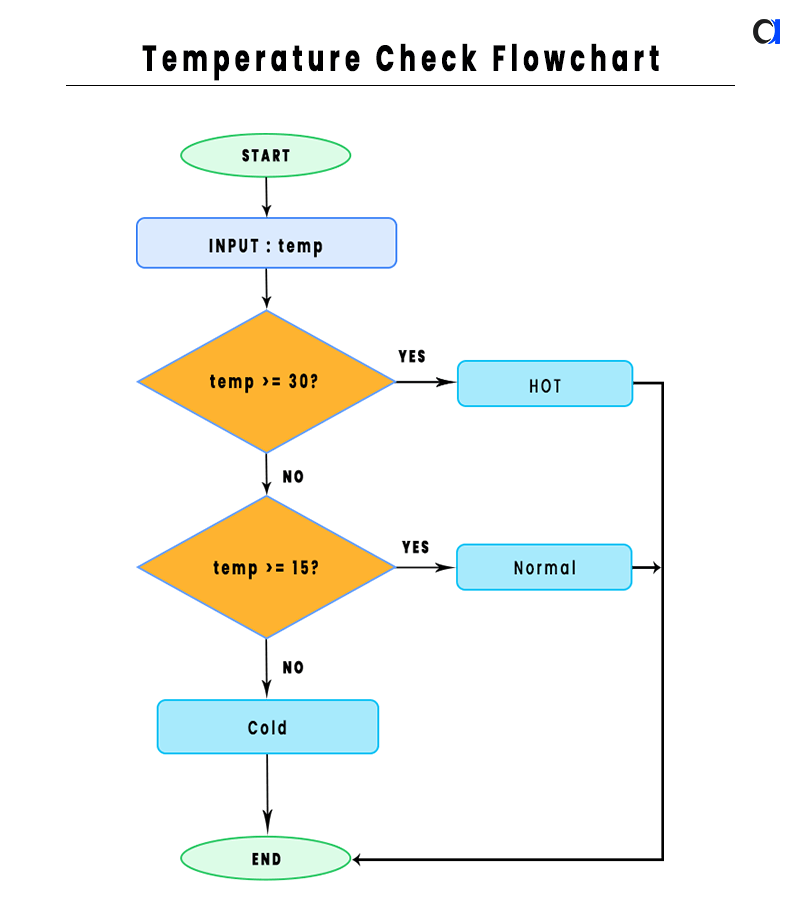
यह flowchart clearly दिखाता है कि program किस order में conditions check करता है।
Conclusion ( निष्कर्ष )
C Program to Check Temperature एक simple लेकिन बेहद useful program है जो C Language के fundamentals को practically demonstrate करता है। इस program के through आपने सीखा कि float variables कैसे declare करते हैं, scanf() और printf() कैसे काम करते हैं, और if-else if-else ladder का structure क्या होता है। यह program न सिर्फ beginners के लिए एक अच्छा practice exercise है बल्कि conditional logic की solid foundation भी बनाता है जो आगे के complex programs में काम आती है।
अगर आप C Programming को और deeply समझना चाहते हैं तो इस program को खुद type करके run करें, अलग-अलग temperature values try करें, और conditions को modify करके देखें क्या होता है। Practice ही सबसे बड़ा teacher है। नीचे comment करके बताएं कि आपको यह post helpful लगी या नहीं, और अगर कोई doubt है तो जरूर पूछें!