
File Input and Output in C in Hindi — आज इसी topic को हम आसान भाषा और practical examples के साथ समझेंगे। जब हम कोई program बनाते हैं, तो data को permanently save करने की जरूरत पड़ती है — और इसी काम को करने के लिए File I/O का use करते हैं। बिना file handling जाने, आप एक complete application नहीं बना सकते।
इस article में हम step-by-step समझेंगे कि C language में files कैसे open की जाती हैं, data कैसे read और write किया जाता है, और errors को कैसे handle करते हैं। चाहे आप student हों या beginner programmer, यह guide आपको पूरी clarity देगी। यहाँ दिए गए examples real-world scenarios पर based हैं जो आपको practically समझने में मदद करेंगे।
इस post को पढ़ने के बाद आप जानेंगे FILE pointer क्या होता है, fopen, fclose, fread, fwrite, fprintf, fscanf जैसे functions कैसे काम करते हैं, text और binary files में क्या फर्क है, और एक complete file program कैसे लिखते हैं। तो चलिए शुरू करते हैं!
Table of Contents
File Handling in C क्या है?
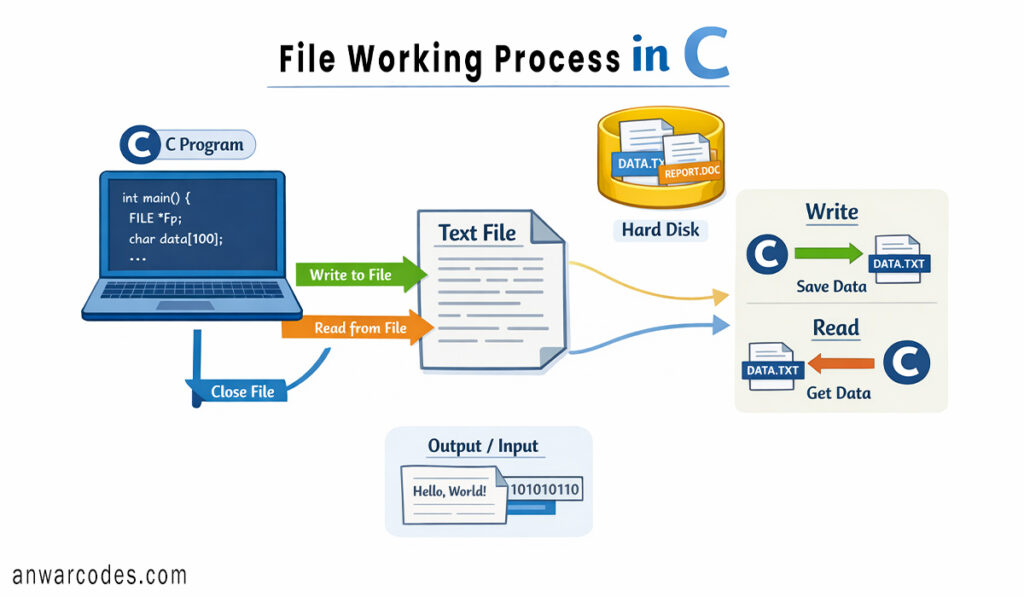
C programming में file handling वह process है जिसके जरिए हम किसी external file में data read या write कर सकते हैं। जब program बंद हो जाता है तो RAM का सारा data मिट जाता है — लेकिन अगर हमने उसे किसी file में save किया हो, तो वह permanently disk पर रहता है।
File I/O के मुख्य फायदे:
- data permanently store होता है
- बड़े amount of data को आसानी से handle किया जा सकता है
- दो programs के बीच data sharing हो सकती है
- Error logs और reports बनाना आसान हो जाता है
इसीलिए आज File Input and Output in C in Hindi ,में समझेंगे, जो beginners से Advance तक के Programmer के लिये फायदेमंद होगा।
C में File के प्रकार
C language में basically दो प्रकार की files होती हैं:
1. Text Files (.txt)
इनमें data human-readable format में store होता है। हर line के अंत में newline character होता है। ये files किसी भी text editor में खुल सकती हैं।
2. Binary Files (.bin, .dat)
इनमें data binary format (0 और 1) में store होता है। ये files directly memory से read होती हैं, इसलिए faster होती हैं। Images, audio files, और databases binary format में होती हैं।
FILE Pointer — फाइल का दरवाजा
C में file को handle करने के लिए एक special pointer use होता है जिसे FILE pointer कहते हैं। यह stdio.h header file में define होता है।
FILE *fp;
यह pointer file के बारे में सारी information रखता है — current position, error status, end-of-file flag, आदि।
fopen() — File खोलना
किसी भी file के साथ काम शुरू करने से पहले उसे open करना पड़ता है। इसके लिए fopen() function use होता है।
Syntax:
FILE *fopen(const char *filename, const char *mode);
File Opening Modes की पूरी लिस्ट
| Mode | मतलब |
|---|---|
| “r” | File को read के लिए (file exist होनी चाहिए) |
| “w” | File को write के लिए (अगर file नहीं है तो नई file create होगी, अगर file है तो पहले का सारा Data Erase हो जायेगा |
| “a” | File के अंत में data add करने के लिये (append mode) |
| “r+” | Read और write दोनों के लिये |
| “w+” | Read और write, और नई file बनाने के लिये |
| “rb” | Binary file read करने के लिये |
| “wb” | Binary file write करने के लिये |
fopen() Example Code:
#include <stdio.h>

int main() {
    FILE *fp;

    // Open file in write mode
    fp = fopen("students.txt", "w");

    // Check if file opened successfully or not
    if (fp == NULL) {
        printf("File could not be opened!\n");
        return 1;
    }

    printf("File opened successfully!\n");

    // Close the file after use
    fclose(fp);

    return 0;
}
अगर fopen() fail हो जाए तो यह NULL return करता है — इसलिए हमेशा NULL check करें।
fclose() — File बंद करना
File के साथ काम खत्म होने के बाद उसे बंद करना जरूरी है। इससे:
- Memory free होती है
- Data properly disk पर save होता है
- File corruption से बचाव होता है
fclose(fp);
यह एक simple लेकिन बेहद जरूरी step है जिसे beginners अक्सर भूल जाते हैं।
fprintf() और fscanf() — Text File में Read/Write
fprintf() से File में लिखना
fprintf() function printf() जैसे ही काम करता है, बस output screen की जगह file में write होता है।
#include <stdio.h>

int main() {
    FILE *fp;

    // Open file in write mode
    fp = fopen("record.txt", "w");

    // Check if file opened successfully
    if (fp == NULL) {
        printf("Error!\n");
        return 1;
    }

    // Write data into the file
    fprintf(fp, "Name: Rahul\n");
    fprintf(fp, "Roll No: 101\n");
    fprintf(fp, "Marks: 95\n");

    // Close the file
    fclose(fp);

    printf("Data has been saved to the file!\n");

    return 0;
}
fscanf() से File से पढ़ना
fscanf() function भी scanf() जैसे ही काम करता है लेकिन scanf() function का use keyboard से data input लेने के लिए करते है और fscanf() का इस्तेमाल file से data read करने के लिए किया जाता है।
#include <stdio.h>

int main() {
    FILE *fp;
    char name[50];
    int roll, marks;

    // Open file in read mode
    fp = fopen("record.txt", "r");

    // Check if file exists or not
    if (fp == NULL) {
        printf("File not found!\n");
        return 1;
    }

    // Read data from the file
    fscanf(fp, "Name: %s\n", name);
    fscanf(fp, "Roll No: %d\n", &roll);
    fscanf(fp, "Marks: %d\n", &marks);

    // Display file data on screen
    printf("Name: %s\nRoll: %d\nMarks: %d\n", name, roll, marks);

    // Close the file
    fclose(fp);

    return 0;
}
Example File Content (record.txt)
Output:
fgetc() और fputc() — Character-by-Character I/O
जब हमें एक-एक character read या write करना हो तो ये functions use होते हैं।
printf() — एक character लिखना:
fputc(‘A’, fp);
fgetc() — एक character पढ़ना:
char ch = fgetc(fp);
पूरी file read करने का तरीका:
#include <stdio.h>

int main() {
    FILE *fp;
    char ch;

    // Open file in read mode
    fp = fopen("notes.txt", "r");

    // Read and print characters one by one
    while ((ch = fgetc(fp)) != EOF) {
        putchar(ch);
    }

    // Close the file
    fclose(fp);

    return 0;
}
Example File Content (notes.txt)
Output :
यहाँ char ch = fgetc(fp); (End of File) एक special marker है जो बताता है कि file खत्म हो गई।
fgets() और fputs() — Line-by-Line I/O
पूरी line एक बार में read/write करने के लिए:
fputs का इस्तेमाल हम file में एक पूरी line को Write करने के लिये करते हैं।
fputs(“This is test line to write one line in file. “, fp);
fgets function का use हम file से एक line पढ़ने के लिये करते हैं।
char line[100];
fgets(line, 100, fp);
printf(“%s”, line);
Binary File में fread() और fwrite()
File Input and Output in C in Hindi का एक advanced हिस्सा है binary file I/O। जब structures या arrays को directly save करना हो तो यह method बेहद efficient है।
fwrite() — Binary Data लिखना
#include <stdio.h>

// Structure to store student details
struct Student {
    char name[50];
    int roll;
    float marks;
};

int main() {
    FILE *fp;

    // Initialize structure variable
    struct Student s1 = {"Priya", 102, 88.5};

    // Open binary file in write mode
    fp = fopen("data.bin", "wb");

    // Write structure data into binary file
    fwrite(&s1, sizeof(struct Student), 1, fp);

    // Close the file
    fclose(fp);

    printf("Binary data saved successfully!\n");

    return 0;
}
Binary File (data.bin)
The file stores student data in binary format, so it cannot be read properly in a normal text editor.
fread() — Binary Data पढ़ना
#include <stdio.h>

// Structure to store student details
struct Student {
    char name[50];
    int roll;
    float marks;
};

int main() {
    FILE *fp;
    struct Student s1;

    // Open binary file in read mode
    fp = fopen("data.bin", "rb");

    // Read structure data from binary file
    fread(&s1, sizeof(struct Student), 1, fp);

    // Close the file
    fclose(fp);

    // Display student data
    printf("Name: %s\nRoll: %d\nMarks: %.2f\n",
           s1.name, s1.roll, s1.marks);

    return 0;
}
Binary files text files से fast और compact होती हैं।
fseek() और ftell() — File में Navigation
कभी-कभी हमें file के किसी specific position पर जाना होता है।
निचे लिखा गया fseek() function file की शुरुआत से 10 bytes आगे जाने के लिये है
fseek(fp, 10, SEEK_SET);
ftell() function file की current position जानने के लिये है
long pos = ftell(fp);
printf(“Current position: %ld “, pos);
rewind() function file के शुरुआत में जाने के लिए है
rewind(fp);
fseek() के तीन SEEK constants:
- SEEK_SET — File की शुरुआत से
- SEEK_CUR — Current position से
- SEEK_END — File के अंत से
Error Handling in File Operations
File Input and Output in C में सीखते समय error handling ignore नहीं करनी चाहिए। एक professional program हमेशा errors handle करता है।
#include <stdio.h>
#include <errno.h>

int main() {

    // Try to open a file in read mode
    FILE *fp = fopen("absent_file.txt", "r");

    // Check if file opening failed
    if (fp == NULL) {

        // Print system-generated error message
        perror("Error");
        return 1;
    }

    fclose(fp);

    return 0;
}
perror() function automatically error description print करता है जैसे: Error: No such file or directory
Complete Example — Student Record System
#include <stdio.h>

// Structure to store student details
struct Student {
    char name[50];
    int roll;
    float marks;
};

// Function to save student record into binary file
void save_record(struct Student s) {

    // Open file in append binary mode
    FILE *fp = fopen("students.dat", "ab");

    if (fp == NULL) {
        printf("Error!\n");
        return;
    }

    // Write structure data into file
    fwrite(&s, sizeof(struct Student), 1, fp);

    fclose(fp);
}

// Function to display all student records
void show_records() {
    FILE *fp = fopen("students.dat", "rb");
    struct Student s;

    // Check if file exists
    if (fp == NULL) {
        printf("No records found.\n");
        return;
    }

    printf("\n--- Student Records ---\n");

    // Read records one by one from file
    while (fread(&s, sizeof(struct Student), 1, fp)) {
        printf("Name: %s | Roll: %d | Marks: %.2f\n",
               s.name, s.roll, s.marks);
    }

    fclose(fp);
}

int main() {

    // Create student records
    struct Student s1 = {"Amit", 1, 92.5};
    struct Student s2 = {"Sneha", 2, 87.0};

    // Save records into file
    save_record(s1);
    save_record(s2);

    // Display saved records
    show_records();

    return 0;
}
यह एक mini student management system है — यही असली programming होती है!
Quick Reference — Important Functions
| Function | काम |
|---|---|
| fopen() | File open के लिये |
| fclose() | File बंद करने के लिये |
| fprintf() | Formatted text लिखने के लिये |
| fscanf() | Formatted text पढ़ने के लिये |
| fgetc() | एक character पढ़ने के लिये |
| fputc() | एक character लिखने के लिये |
| fgets() | एक line पढ़ने के लिये |
| fputs() | एक line लिखने के लिये |
| fread() | Binary data पढ़ने के लिये |
| fwrite() | Binary data लिखने के लिये |
| fseek() | File में navigate करने के लिये |
| ftell() | Current position जानने के लिये |
| rewind() | शुरुआत में जाने के लिये |
| feof() | File end check करने के लिये |
| perror() | Error message दिखाने के लिये |
Conclusion ( निष्कर्ष )
तो आज आपने सीखा कि File Input and Output in C in Hindi एक ऐसा topic है जो आपकी C programming को एक नए level पर ले जाता है। अब आप जानते हैं कि files कैसे open, read, write और close की जाती हैं — text format में भी और binary format में भी। fopen से लेकर fseek तक, हर function का एक clear purpose है और जब ये मिलकर काम करते हैं तो आप real-world applications बना सकते हैं जैसे student records, inventory management, या login systems। यहाँ दिए गए examples को खुद अपने computer पर run करें — theory पढ़ने से ज्यादा coding practice से सीखा जाता है।
अगर आप सच में C programming में मजबूत बनना चाहते हैं, तो आज ही एक छोटा project बनाएं जिसमें file handling use हो — जैसे एक simple diary app या marks calculator जो data file में save करे। इस article को अपने दोस्तों और classmates के साथ share करें जो C सीख रहे हैं। नीचे comment में बताएं — कौन सा concept आपको सबसे useful लगा? और अगर कोई doubt हो तो पूछें, हम हर सवाल का जवाब देते हैं!