
अगर आप C programming सीख रहे हैं, तो print multiplication table in C using for loop वाला topic एक बहुत ही important concept है। यह program beginners के लिए perfect है क्योंकि इसमें loops का basic understanding बनता है और logic बिल्कुल simple होता है।
आज इस post में हम step-by-step देखेंगे कि C language में for loop का use करके किसी भी number की multiplication table कैसे print की जाती है। साथ में program का complete explanation, output, और कुछ interesting variations भी देखेंगे।
Multiplication Table क्या होती है?
Multiplication table basically किसी number को 1 से 10 (या जितना चाहें) तक multiply करके उसका result दिखाती है। जैसे 5 की table में: 5×1=5, 5×2=10, 5×3=15… और इसी pattern को हम C program में for loop के through automate कर सकते हैं।
इस program को solve करने के लिए हमें C language में loops, variables, और printf/scanf functions की basic knowledge होनी चाहिए। अगर ये सब आपको already आता है, तो यह program आपके लिए बिल्कुल simple होगा अगर नहीं आता तो anwarcodes.com पर जाएं वहाँ c programming का basic से लेकर advanced तक के tutorial मिलेंगे।
C Program: Print Multiplication Table Using For Loop
नीचे दिया गया program C language में for loop use करके user से number लेकर उसकी multiplication table print करता है:
#include <stdio.h>

int main() {
/* Print Multiplication Table */
    int n, i;

    printf("Enter a number: ");
    scanf("%d", &n);

	for (i = 1; i <= 10; i++) {
        printf("%d x %d = %d\n", n, i, n * i);
	}

    return 0;
}
Program का Step-by-Step Explanation
Step 1 – Header File Include करना
#include <stdio.h> यह line C program में standard input-output header file को include करती है। इसके बिना हम printf() और scanf() functions use नहीं कर सकते। यह हर C program की पहली line होती है।
Step 2 – Variables Declare करना
int n, i; — यहाँ हमने दो integer variables declare किए हैं। n में user का number store होगा और i loop counter का काम करेगा। C language में variable declaration program की शुरुआत में करनी होती है।
Step 3 – User से Input लेना
printf() से user को message दिखाते हैं और scanf(“%d”, &n) से उसका input लेते हैं। %d format specifier integer value के लिए use होता है। &n का मतलब है, n का memory address, जहाँ value store होगी।
Step 4 – For Loop का Logic
यही इस program का core part है। for (i = 1; i <= 10; i++) loop i को 1 से शुरू करता है, हर iteration में 1 बढ़ाया जाता है, और 10 तक चलता है। अंदर printf() से n × i का result print होता है। यही वो loop है जो multiplication table को automate करता है।
Program का Output कैसा दिखेगा?
अगर user 7 enter करता है, तो output कुछ ऐसा होगा:
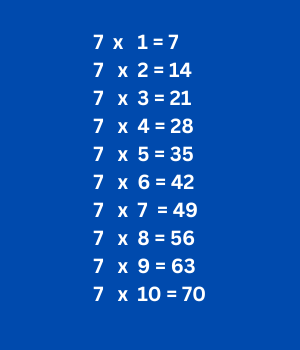
Interesting Variations — Program को और Better बनाएं
Variation 1: Custom Range Table
अगर आप चाहते हैं कि user खुद range decide करे (जैसे 1 से 20 तक का table), तो बस एक और variable add करें और scanf से range भी लें। Loop की condition i <= range कर दें। इससे यह program और flexible होगा।
निचे Custom Range table program दिया गया है:
Custom Range Table Program
#include<stdio.h>
int main()
{
int i, number, range;
// User se number aur range input lena
printf("=============================\n");
printf(" Multiplication Table\n");
printf("=============================\n");
printf("\nEnter the number: ");
scanf("%d", &number);
printf("Enter the range (table up to): ");
scanf("%d", &range);
// Table print karna
printf("\n--- Table of %d (1 to %d) ---\n", number, range);
for(i = 1; i <= range; i++)
{
printf("%d x %2d = %3d\n", number, i, number * i);
}
printf("-----------------------------\n");
return 0;
}
Variation 2: Multiple Tables एक साथ
Nested for loops use करके आप उतनी tables print कर सकते हैं जितनी चाहें। User खुद decide करता है कि कितनी tables चाहिए — program 1 से उस number तक automatically सभी tables print कर देता है। Outer loop number के लिए और inner loop multiplier के लिए। यह C में nested loops का एक classic example है।
Multiple Table Program in C Using Nested For Loop
#include<stdio.h>
int main()
{
int i, j, totalTables;
printf("=============================\n");
printf(" Multiple Tables Printer\n");
printf("=============================\n");
printf("\nHow many tables do you want? ");
scanf("%d", &totalTables);
// Print tables from 1 to totalTables for each number
for(i = 1; i <= totalTables; i++)
{
printf("\n------------------------\n");
printf(" Table of %-2d", i);
printf("\n------------------------\n");
for(j = 1; j <= 10; j++)
{
printf(" %2d x %2d = %3d\n", i, j, i * j);
}
}
printf("\n=============================\n");
printf(" All Tables Done!\n");
printf("=============================\n");
return 0;
}
Variation 3: While Loop से भी होता है
हालांकि हम यहाँ print multiplication table in C using for loop सीख रहे हैं, लेकिन same logic while loop से भी implement हो सकती है। For loop तब ज़्यादा suitable होता है जब हमें exact iterations पता हों (जैसे 1 से 10), इसलिए यहाँ for loop best choice है। Multiplication while loop में खुद implement करके देखें, और code comment box में डालें देखते हैं कितने लोग implement कर पाते हैं बिना cheating किये।
Common Mistakes जो Beginners करते हैं
- Loop में i = 0 से शुरू करना — इससे table 0 से शुरू होगी जो गलत है। हमेशा i = 1 से start करें।
- scanf में & लगाना भूलना — scanf(“%d”, n) गलत है, सही है scanf(“%d”, &n). & के बिना program crash हो सकता है।
- Printf में \n भूल जाना — बिना newline के सारा output एक ही line में आएगा जो unreadable होगा।
- Loop condition में < vs <= का confusion — i < 10 से loop 9 तक चलेगी, 10 × table नहीं print होगी। Use करें i <= 10.
For Loop को ही क्यों Use करते हैं?
C language में तीन types के loops होते हैं — for, while, और do-while लेकिन multiplication table जैसे cases में जहाँ हमें पहले से पता है कि loop कितनी बार चलनी है (1 से 10), वहाँ for loop सबसे clean और readable option होती है।
इसके अलावा, for loop में initialization, condition, और increment तीनों एक ही line में होते हैं जो code को concise और easy to understand बनाता है। यही reason है कि C programming में loop-based problems के लिए for loop को prefer किया जाता है।
Conclusion ( निष्कर्ष )
तो दोस्तों, आज हमने सीखा कि print multiplication table in C using for loop Program कैसे बनाया जाता है, Nested for loop का इस्तेमाल करके कैसे Multiple Table print कर सकते हैं। यह program बहुत simple है लेकिन इसके through आप loops, variables, input-output, और arithmetic operators — C के सबसे important concepts — एक साथ practice कर सकते हैं।
इस code को खुद type करके compile करें, different numbers try करें, और variations को भी implement करें। Hands-on practice से ही programming में mastery आती है। अगर कोई doubt हो तो comment में ज़रूर पूछें!